Title: LCD for NextStation Turbo Color (ADB)
Post by: g_c_p on December 01, 2021, 05:11:40 PM
Post by: g_c_p on December 01, 2021, 05:11:40 PM
Figured I'd write up some stuff I've messed with recently in case it's of use to anyone.
A few months ago I picked up a Turbo Color slab that I recently got around to getting functional again.
For a while I thought the system was not functioning properly, since I could not get a video signal out of it. The Color MegaPixel display that came with it seemed to power on OK but gave no picture. I hooked up a Dell P1914S that I had used with good success with other vintage computers, and no dice on that either.
On a whim I tried connecting the video several seconds after booting, and that did the trick - the monitor could sync with the 68Hz refresh rate, but not the 72Hz apparently. A little annoying to have to do a plug/unplug dance every time I booted but at least I was unblocked.
With that problem solved, it was on to the next. I still wasn't booting; hardware tests seemed to go OK but I got some cryptic message that I didn't even get Google results for, seemingly when it was trying to boot after all of the internal diagnostics. I assumed it was a problem with the SCSI2SD hardware, or the filesystem on the SD card, but I got the same error message even after trying different SD cards and OS versions.
Eventually I realized I was an idiot, and had the DIMMs installed in the wrong slots; it was simply unable to access the memory locations it needed to in order to boot. Once I re-installed the memory, the system booted as expected.
The Dell monitor I was using is natively 1280 x 1024, which is of course 5:4 rather than 4:3 as the black hardware was designed for.
I picked up a NEC MultiSync LCD2090UXi (1600 x 1200) which I am happy to report works great. It will either scale up the signal, or display the original unscaled with black borders. It syncs at the 1152 x 864 @ 72Hz signal that the ADB system wants to output by default, so no cable dances on boot. I suspect just about any other 1600 x 1200 panel would perform as well. But if anyone is looking for options, this is a good one.
A few months ago I picked up a Turbo Color slab that I recently got around to getting functional again.
For a while I thought the system was not functioning properly, since I could not get a video signal out of it. The Color MegaPixel display that came with it seemed to power on OK but gave no picture. I hooked up a Dell P1914S that I had used with good success with other vintage computers, and no dice on that either.
On a whim I tried connecting the video several seconds after booting, and that did the trick - the monitor could sync with the 68Hz refresh rate, but not the 72Hz apparently. A little annoying to have to do a plug/unplug dance every time I booted but at least I was unblocked.
With that problem solved, it was on to the next. I still wasn't booting; hardware tests seemed to go OK but I got some cryptic message that I didn't even get Google results for, seemingly when it was trying to boot after all of the internal diagnostics. I assumed it was a problem with the SCSI2SD hardware, or the filesystem on the SD card, but I got the same error message even after trying different SD cards and OS versions.
Eventually I realized I was an idiot, and had the DIMMs installed in the wrong slots; it was simply unable to access the memory locations it needed to in order to boot. Once I re-installed the memory, the system booted as expected.
The Dell monitor I was using is natively 1280 x 1024, which is of course 5:4 rather than 4:3 as the black hardware was designed for.
I picked up a NEC MultiSync LCD2090UXi (1600 x 1200) which I am happy to report works great. It will either scale up the signal, or display the original unscaled with black borders. It syncs at the 1152 x 864 @ 72Hz signal that the ADB system wants to output by default, so no cable dances on boot. I suspect just about any other 1600 x 1200 panel would perform as well. But if anyone is looking for options, this is a good one.
Title: Re: LCD for NextStation Turbo Color (ADB)
Post by: sappas on May 09, 2024, 04:14:34 PM
Post by: sappas on May 09, 2024, 04:14:34 PM
Quote from: g_c_p on December 01, 2021, 05:11:40 PMOn a whim I tried connecting the video several seconds after booting, and that did the trick - the monitor could sync with the 68Hz refresh rate, but not the 72Hz apparently. A little annoying to have to do a plug/unplug dance every time I booted but at least I was unblocked.
Very interesting... î'll try, and it failed probably because my monitor can sync at 72 hz but at a bad resolution
Title: Re: LCD for NextStation Turbo Color (ADB)
Post by: sappas on May 11, 2024, 03:22:46 PM
Post by: sappas on May 11, 2024, 03:22:46 PM
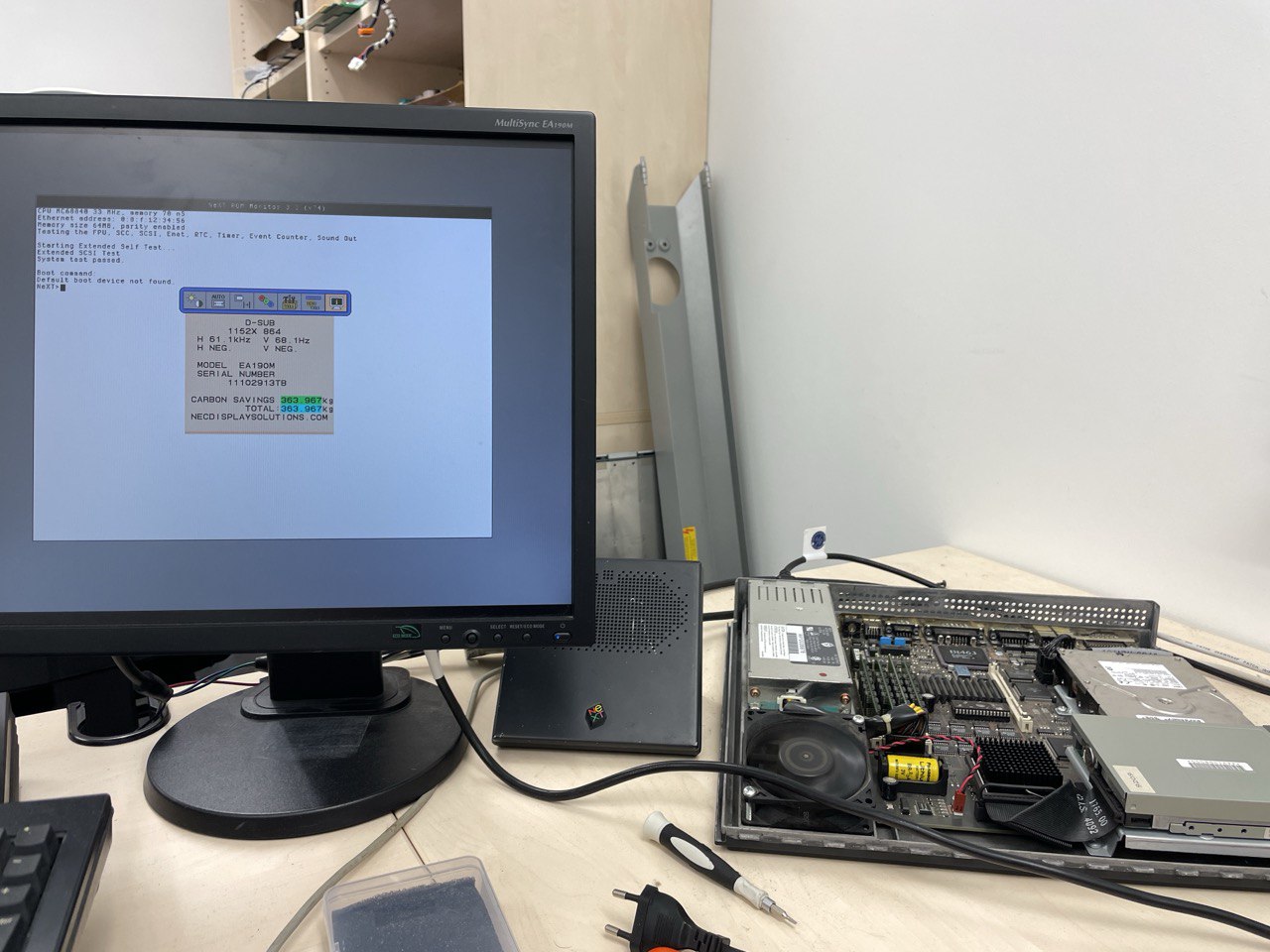
I own 3 Nec EA190m it fit perfectly for Next and my vsync for 1152*864 is 68 Hz, at 72 hz the display was ugly with 720 * 576 only
Cuby make a rom v74 with vsync 68 hz instead of 72 hz by default
Take a look
https://www.nextcomputers.org/forums/index.php?topic=5107
Cuby make a rom v74 with vsync 68 hz instead of 72 hz by default
Take a look
https://www.nextcomputers.org/forums/index.php?topic=5107
Title: Re: LCD for NextStation Turbo Color (ADB)
Post by: cuby on May 11, 2024, 05:19:38 PM
Post by: cuby on May 11, 2024, 05:19:38 PM
I just went to the office and burned the EPROM myself and can confirm it works :). By coincidence, I also have a NEC EA190M connected (the ADB keyboard is connected even though the corner of the non-ADB keyboard can be seen in the photo)...
Title: Re: LCD for NextStation Turbo Color (ADB)
Post by: sappas on May 11, 2024, 11:08:14 PM
Post by: sappas on May 11, 2024, 11:08:14 PM
And you can on the Next monitor, we have the same mac address 0.0.f.12.34.56.... next correction
Title: Re: LCD for NextStation Turbo Color (ADB)
Post by: cuby on May 12, 2024, 01:34:41 AM
Post by: cuby on May 12, 2024, 01:34:41 AM
Quote from: sappas on May 11, 2024, 11:08:14 PMAnd you can on the Next monitor, we have the same mac address 0.0.f.12.34.56Hah, yes, forgot to change it before burning the EPROM :).