Poll
Blame NeXT for that ;D
I'll add in some stuff that looks at CPU type as well as CPU subtype. I wonder if it has the same behavior on PA-RISC.
Re NXFactor... ~1 should be a 25MHz '040 Cube with 24MB RAM and grayscale display.
I'm thinking of re-basing '1' to represent an 25MHz '030 NeXTcomputer with 16MB RAM.
Re the number difference... the machine I developed NSBench on is a 4GHz Intel i7, hence the huge numeric difference.
I'd say basing 1 to the lowest-spec'd real NeXT machine sounds reasonable.
Ok, that CPU makes sense, I just saw it said it was a 486 and was stunned how that could be *that* much faster than my Sparc ;D
NXFactor exercises the Display PostScript subsystem, which has the following dependencies:
In fact, when I run NXBench on Previous configured as a 25MHz '040 Cube with 16MB RAM, I initially get around 240KB of free memory once the OS loads the NSBench program and bundle images into RAM. DPS exercises the swap file when I execute the NXFactor benchmark, which immediately creates a disk I/O bottleneck, which skews the results.
Right now, NSBench is only compiled on NEXTSTEP 3.3, so it will not use any of the OPENSTEP frameworks whatsoever:
So any differing results could -- on a system with 0 load at rest and with sufficient RAM to avoid page faults and swapping -- be placed squarely on the shoulders of anything else other than the OPENSTEP frameworks. There are a lot of other variables at play.
Let's look at the results of both NEXTSTEP 3.3 and OPENSTEP 4.2 running in identically-configured VMware virtual machines (all listed times are in milliseconds.)
The biggest differences there are transposition and compositing. There could have been a change between DPS 125.19 (NS3.3) and DPS 184 (OS4.2) that affects those DPS operations, but we don't know. Instead, confirmation bias kicks in.
To give you an idea of how things can skew results, here are the differences between OS 4.2 and OS 4.0 Mecca.
What threw out the window move results? I'd guess the fact that Mecca has that background image thing going on, and I didn't change it. In fact, when I set it to the default solid colour, the window move test takes 260ms.
For anything meaningful to be construed from the differences between NEXTSTEP 3.3, OPENSTEP 4.0, and OPENSTEP 4.2 we would need be aware of the exact differences. The number of variables involved is too great.
Ideally, I should re-factor NSBench so that there are TWO bases. One for NEXTSTEP 3.3, and another for OPENSTEP 4.2. Any port of NSBench to anything else should have a baseline for that thing, e.g. NSBench on NEXTSTEP 2.2 should have a baseline for NEXTSTEP 2.2. In fact, I think that is precisely what I will do.
Benchmarking library load times will also be highly misleading given that loading object files and libraries etc is I/O-bound (disk I/O, memory access speed, swap I/O, etc etc). It wouldn't give an indication of the performance of the kernel itself.
The point you appear to be trying to make -- that OPENSTEP is bloat and is causing loading to be slower -- is confirmation bias. In simple terms, WriteNow would not be loading any OPENSTEP framework whatsoever -- it's linked against libNeXT_s and libsys_s only.
I'd need to dig into the sources to see if `rld' uses ref counting. If it does, then `rld_unload' might not trigger Mach to immediately remove the object from memory as something else could be using it.
It probably does use ref counting, as shared libraries were a big thing in Unix at the time -- the fact that a shared library is kept around in main memory for as long as its needed in order to ensure other programs using the same library do not load the library every time they're executed; with the added bonus that there is less overall memory usage. In simple terms, even if WriteNow made use of OPENSTEP frameworks, they would already be in memory due to Workspace loading them when it starts up.
The speed of an application starting up has many variables and factors, benchmarking those is potentially meaningless, as it could boil down to a mix of cache hits vs misses and the I/O that results from a miss.
It's actually been a lot of fun. I haven't really done any stuff involving Display PostScript before. Most of my code has been with Ye Olde AppKit, OpenStep AppKit/Foundation, and occasionally MiscKit.
I've even managed to write a usable DPS userpath test!
Next step will be CoreMark, which will be interesting to hack up in a portable way. I'm hoping I can use ObjC's List and HashTable alongside plain C linked-lists and hash tables.
It might end up being CoreMark+ObjC, but it ought to be fun nonetheless. :)
My original plan was to invoke the wrath of
But, GCC is clever and knows that `cpuid` requires an i586, resulting in an i586 CPU subtype in the Mach-O header, which the Mach loader balks at. I didn't feel like doing low-level assembler hacks, as the values involved in userland could potentially be changed by context switches.
I suspect that in order to do *any* sort of processor identification for either Motorola or Intel CPUs, I'd need to write a Mach kernel module... the question then becomes "is it worth the effort and the risk of killing the kernel dead?". I think the answer to that is "nah."
Maybe one day I'll explore that, but not until I have other stuff done first :)
I'd also need to figure out how that stuff works on SPARC and PA-RISC. I believe SPARC has the CPU type enumerated in the PROM... thankfully, there's kernel sources available so I can find out.
I have no idea how HP did it, though.
-- edit --
Actually, what would be neat is a programmatic way of identifying whether something is running in Previous. It is possible to identify VMware (and possibly other virtualisation software) by peeking at obscure memory addresses (VMware backchannels and the like), so might be neat to have something similar in Previous -- perhaps a value set in an NI directory or something?
You do not have to give me a hint. I had and used a base machine for quite a while. I worked at NeXT. I remember when we had to add a 40MB hard drive to the optical cube just to help with the swap performance.That was sold as a 'no cost' bonus for a little time.
The base magneto optical only machine weirdly worked well. You could not do a lot of multitasking. But it did work. Weirdly reminded me of my experience with a base 128k Mac when it first came out.
And space was not the problem. Lame performance of the optical drive really was the bottleneck. But.... It was fascinating just how well it worked considering the weird chunky tech.
Next's DMA chip was really something special for its time (and quite a bit of time beyond release it was still superior to most everything out there in how well the optical drive did not bottle neck as much as it would on other systems--I remember moving to intel and that subsystem still was superior to the otherwise way faster intel hardware).
And I think that was a mistake with the NeXT Computer at launch. I think there should have been a faster dedicated backing-store / swapfile drive in the machine alongside the OD.
Having grown up in the 'real' Unix world of swap slices, using the rule of thumb of 'your swap slice is twice the amount of physical RAM', I've seen what happens when you run out of swap. Even now I grind my teeth when I see someone build any sort of Unix or Unix-like system with no swap slice.
Conversely, I've seen what happens when you run out of disk space due to a swap file. On both NeXT and macOS. At least these days macOS forces you to reboot -- found that out after Emacs managed to generate 75 gigabytes of swapfile thanks to flycheck-mode not clearing its buffer when I got to code-review 10,000+ lines of PHP.
The idea that you take your entire install with you on a removable disk was an awesome idea, and I'm kinda sad it didn't catch on at the time. The hardware could have matured. I mean, we could practically do the same thing in the late 90s thanks to USB. I think if swap had been on its own dedicated device outside of the OD, things would have been better.
Imagine if you could go back in time and show engineers what USB can do.
I feel a lot of things were clunky back then... clunky but worked weirdly well -- like the DG AViiON allowing you to share one SCSI disk between two machines.
Anyway, I made an incorrect assumption on newfs and base install size, and assumed the OD would not have enough remaining space for swap.
My test install leaves ~140MB... so that's ~80MB with a worst-case swapfile of 60MB.
So, there's no reason why the baseline couldn't be done with 8MB and an OD... the question is simply: is there anyone with a working OD?
On a separate note, I think I'm going to modify and use `iozone` for the disk benchmarking -- ~80MB is enough for iozone to write out a 42MB test file.
I really regret selling my old cube back in the day. I had an original optical drive and I had a really great cleaning kit for it that I used. It worked great and never had a bit of trouble with and I did use it as the main and SOLE boot drive for a good while.
Do not get me wrong, when I was finally able to afford the 660MB maxtor hard drive from next (and I think it cost around $3000 back in the day, so not cheap), it was like the heavens parted. While it was shocking the machine could work only with a magnetoOptical drive, you never wanted to run the machine that way.
As for why split hairs, well if not, why not put in a loaded max next turbo dimension? And should we test it with an SSD plugged into the SCSI bus instead because that's no longer practical? I could see an argument for being very origin story, and very 'end of story' for the benchmark.
In that this X times faster than how the first NeXT was. Or X times faster than the best NeXT machine there ever was. Kind of a cool factor either way.
As for in between, it's fine, and obviously up to the developer, but just seems somehow less informative than either of those extreme cases. Just my view. Reasonable folks can and will differ.
As always, YMMV.
I remember them and it would still run on a base 8MB 030 optical cube. You would not WANT to run it on that, but it would run.
Here is Neal Drive lol 68030 25Mhz with only 4Mb of ram https://youtu.be/d_JvmIGY1uw so his hobby was making frame by frame models moving the clay characters a frame at a time a little at a time. This cube may actually have run slower than making a frame by frame animated movie. Now his Dad's Code name Gman was much much faster and you guessed it. In the end Gman's Cube was Neal's we updated everything for him ram, motherboard and sd :) He was very excited to receive it with the upgrades on his birthday.! Here was the final Cube https://youtu.be/DZxWCJj0j7o
A correction to my earlier post; I didn't realize I was then (needlessly) running in 32-bit colour (I believe? The mode that says RGB:888/32) and now that I dropped it down to 256 colours (RGB: 256/8) I get much better results: NXFactor between 6.04 - 6.49!
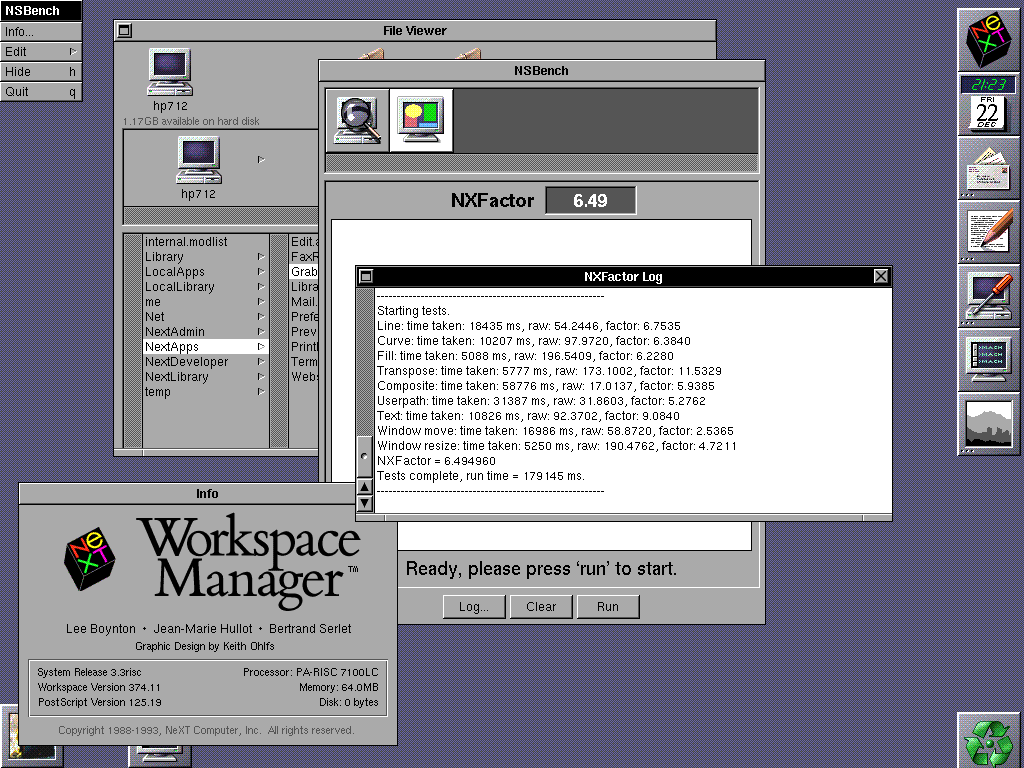
(Although now I am confused; most pages say that the HP 712/60 would require extra VRAM to do even 256 colours @ 1280x1024. I don't have any extra VRAM and can still do 256 and even higher?)
Btw; anyone know what's up with @verdraith, who was last active here in 3/2023 ???
Verdraith has a new repo on his GitHub page. I hope he stops by when time permits. His NeXT repo's are top-notch.
Question: What configuration should NSBench use as a baseline?
Option 1: 25MHz 68030 NeXTcomputer with 16MB RAM
votes: 7
Option 2: 33MHz 68040 NeXTcube with 64MB RAM
votes: 1
Option 3: 25MHz 68040 NeXTstation Color with 64MB RAM
votes: 4
Option 4: 33MHz 68040 NeXTcube with 64MB RAM + 64MB Dimension with NSBench on the colour display.
votes: 4
Title: A new benchmark tool
Post by: verdraith on January 27, 2023, 05:03:58 PM
Post by: verdraith on January 27, 2023, 05:03:58 PM
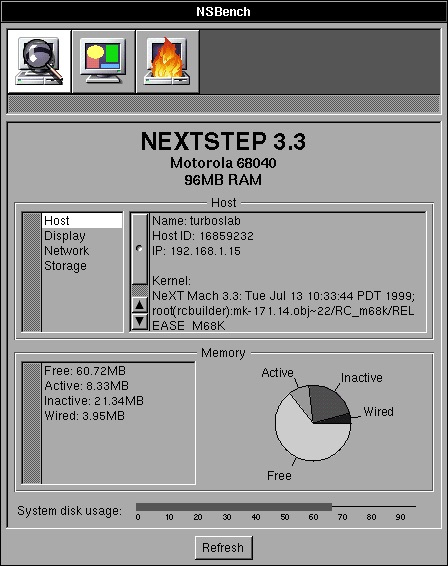
As I mentioned in another topic, Dhrystone is a dead benchmark, so I have started work on an NXBench replacement... called NSBench, because I like inventive names.
It borrows the 'NXFactor' code from GSBench, which is a port of NXBench done by Philippe Robert, but everything else is scratch-written (with help from some code on Nebula and Peanuts.)
Here's what it currently looks like:
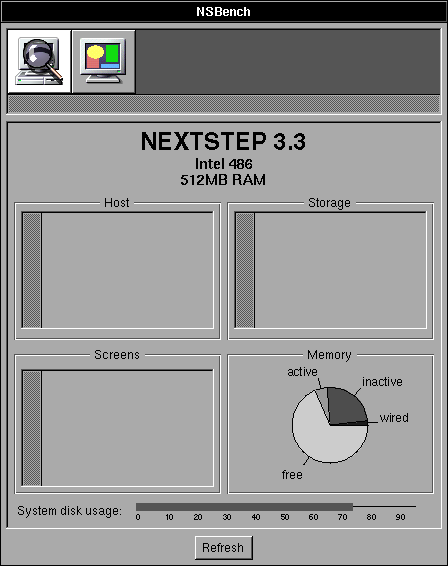
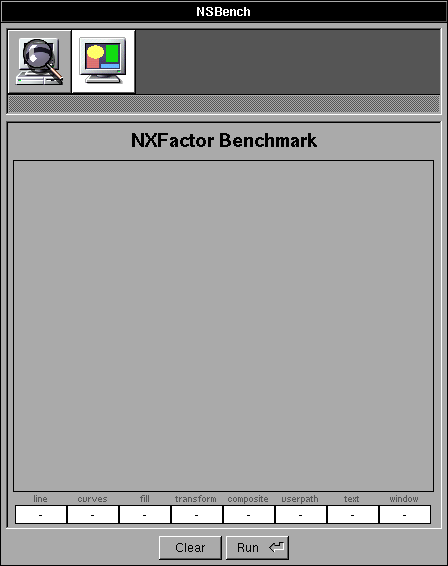
I've architected it such that all benchmarks are bundles, loaded in by the main routine. This will allow me to add further benchmarks (such as CoreMark) as time goes on.
The code I borrowed was the PostScript widgets you see on the system info display -- the pie chart and the line bar.
I'm not 100% sure about the pie chart, I'm sure it can look prettier, but I think that can wait.
I'll keep the thread updated as the project progresses.
It borrows the 'NXFactor' code from GSBench, which is a port of NXBench done by Philippe Robert, but everything else is scratch-written (with help from some code on Nebula and Peanuts.)
Here's what it currently looks like:
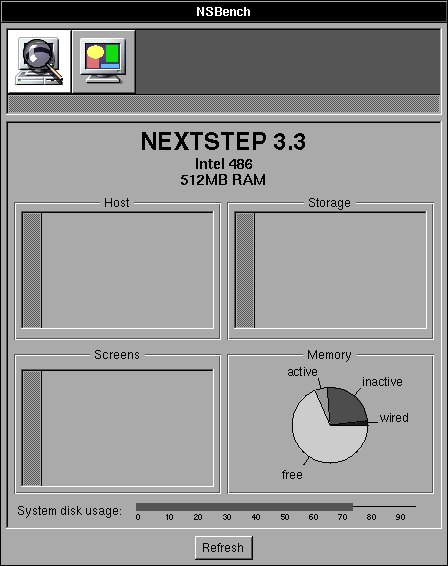
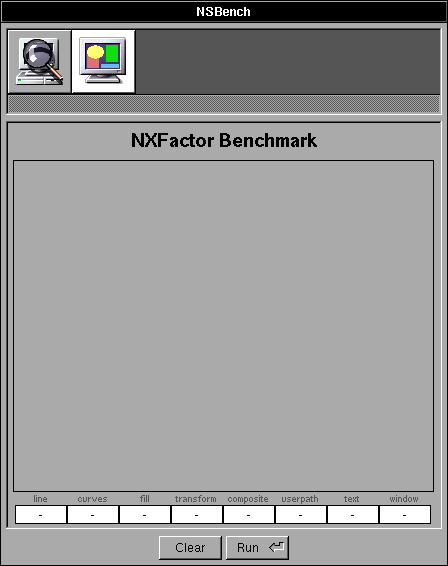
I've architected it such that all benchmarks are bundles, loaded in by the main routine. This will allow me to add further benchmarks (such as CoreMark) as time goes on.
The code I borrowed was the PostScript widgets you see on the system info display -- the pie chart and the line bar.
I'm not 100% sure about the pie chart, I'm sure it can look prettier, but I think that can wait.
I'll keep the thread updated as the project progresses.
Title: Re: A new benchmark tool
Post by: Nitro on January 27, 2023, 05:24:49 PM
Post by: Nitro on January 27, 2023, 05:24:49 PM
This is really cool, can't wait to see it progress.
Title: Re: A new benchmark tool
Post by: verdraith on January 28, 2023, 12:40:06 PM
Post by: verdraith on January 28, 2023, 12:40:06 PM
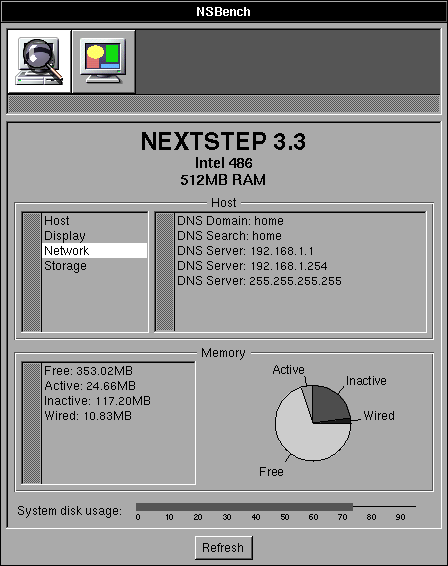
System information bundle is nearly done.
Here it is telling me about my NI /locations/resolver on NS3.3 Intel:
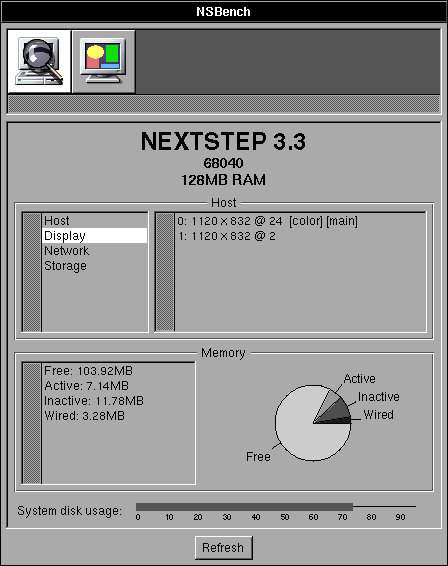
Picking up screens on a plain cube+dimension:
And as a bonus:
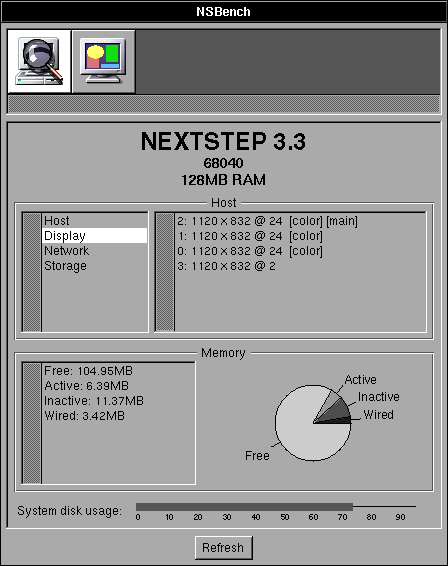
I should really have it sort the list used to populate the display information.
Here it is telling me about my NI /locations/resolver on NS3.3 Intel:
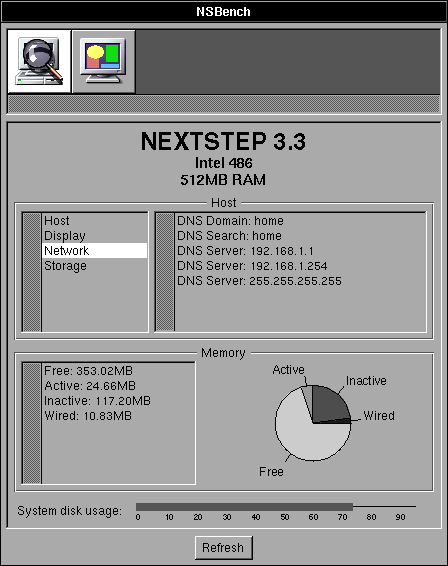
Picking up screens on a plain cube+dimension:
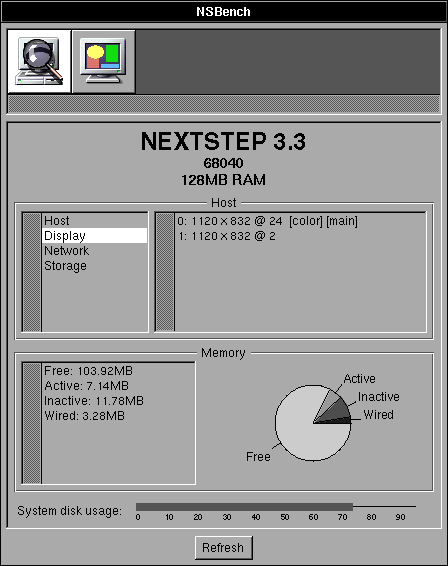
And as a bonus:
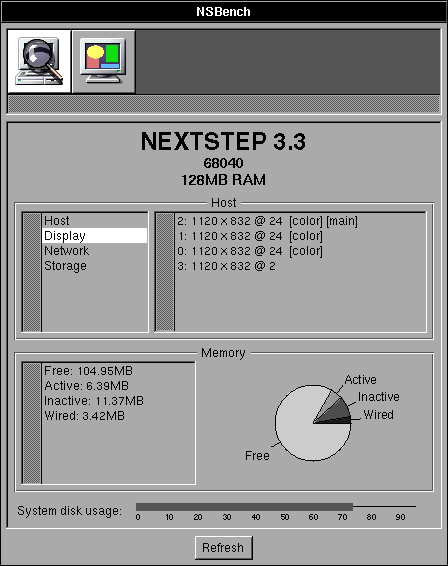
I should really have it sort the list used to populate the display information.
Title: Re: A new benchmark tool
Post by: barcher174 on January 28, 2023, 01:45:47 PM
Post by: barcher174 on January 28, 2023, 01:45:47 PM
Very compelling progress!
Title: Re: A new benchmark tool
Post by: verdraith on January 29, 2023, 01:53:44 PM
Post by: verdraith on January 29, 2023, 01:53:44 PM
System information bundle is pretty much complete.
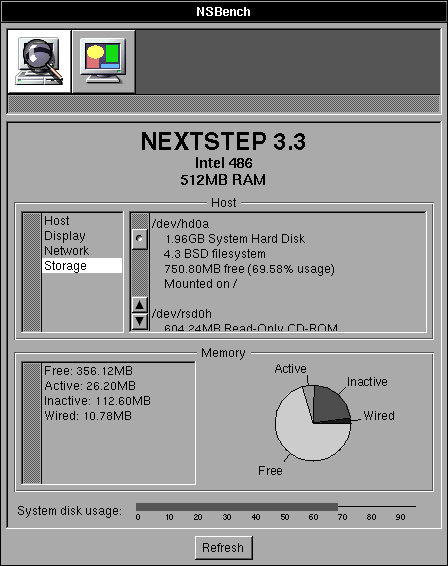
Not sure if adding network interfaces, netmask, gateways, routing table etc would be handy... can always add those later, though.
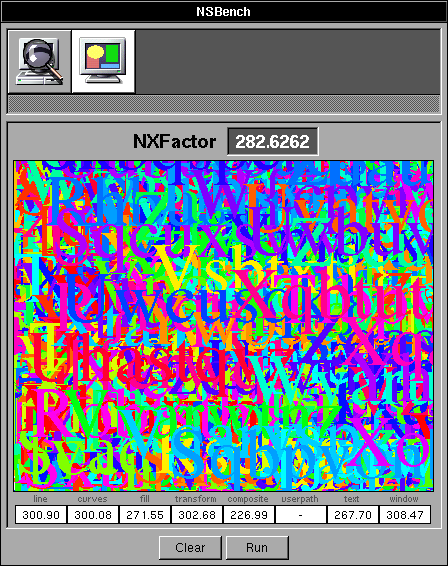
NXFactor is pretty much complete, too
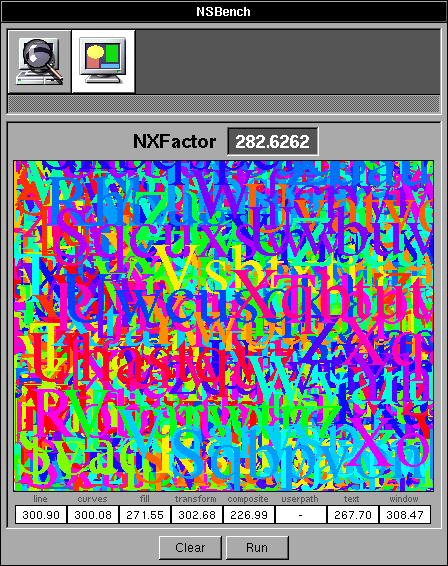
GNUstep port lacks user path PostScript benchmark, and I don't know enough about DPS to re-create it... not a major issue, though.
The numbers appear to be on a par with NXBench 2.0 for NEXTSTEP 3.3, which is great, though I am tempted to optimise the NXFactor code, which will probably require re-normalisation.
Preferably, this ought to be a stock '030 cube. Does anyone have one of those running NS 3.3?
The pre-pre-pre-pre-pre-pre release is available at https://github.com/Asmodai/NeXT-NSBench/releases/tag/v0.1 (https://github.com/Asmodai/NeXT-NSBench/releases/tag/v0.1).
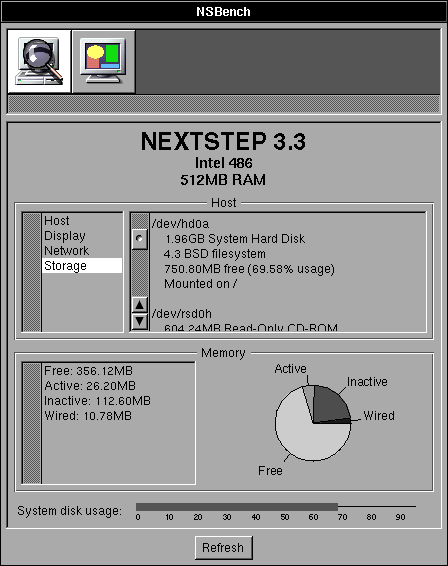
Not sure if adding network interfaces, netmask, gateways, routing table etc would be handy... can always add those later, though.
NXFactor is pretty much complete, too
GNUstep port lacks user path PostScript benchmark, and I don't know enough about DPS to re-create it... not a major issue, though.
The numbers appear to be on a par with NXBench 2.0 for NEXTSTEP 3.3, which is great, though I am tempted to optimise the NXFactor code, which will probably require re-normalisation.
Preferably, this ought to be a stock '030 cube. Does anyone have one of those running NS 3.3?
The pre-pre-pre-pre-pre-pre release is available at https://github.com/Asmodai/NeXT-NSBench/releases/tag/v0.1 (https://github.com/Asmodai/NeXT-NSBench/releases/tag/v0.1).
Title: Re: A new benchmark tool
Post by: user341 on January 29, 2023, 02:19:43 PM
Post by: user341 on January 29, 2023, 02:19:43 PM
Such a cool project! Kudos! We need a window mover and importantly, window RESIZER test. Drive test. Maybe a realtime render man 3d rotating cube test! :D
Super cool.
Super cool.
Title: Re: A new benchmark tool
Post by: verdraith on January 29, 2023, 02:29:31 PM
Post by: verdraith on January 29, 2023, 02:29:31 PM
Not interested in a RenderMan cube :P
if you can find me a Utah Teapot RIB, I can probably spend some time with the documentation.
re window resizing, can probably add that to the NXFactor test.
I'd be tempted to add moving between screens, too... but, that would have to be a 'bonus' score that doesn't affect the overall result.
if you can find me a Utah Teapot RIB, I can probably spend some time with the documentation.
re window resizing, can probably add that to the NXFactor test.
I'd be tempted to add moving between screens, too... but, that would have to be a 'bonus' score that doesn't affect the overall result.
Title: Re: A new benchmark tool
Post by: verdraith on January 29, 2023, 02:37:44 PM
Post by: verdraith on January 29, 2023, 02:37:44 PM
Btw, for the time being, will be easier to attach issues to this thread rather than GitHub's issue tracker.
If you post scores, can you be as detailed as possible about the hardware involved?
Preferably we'd want NXFactor results for all NeXT hardware, as well as HP and Sun hardware.
If you post scores, can you be as detailed as possible about the hardware involved?
Preferably we'd want NXFactor results for all NeXT hardware, as well as HP and Sun hardware.
Title: Re: A new benchmark tool
Post by: Daxziz on January 29, 2023, 03:08:57 PM
Post by: Daxziz on January 29, 2023, 03:08:57 PM
This is awesome work. Love the design and the effort.
More importantly, I really can't thank you enough for releasing the source. If more people would write a small piece of software every now and then, it'll make it so much more fun to fire up the machines. Heck it could be fun just to a game night playing multiplayer together on the boxes xD
But that's for a different thread.
Thanks for the work you put into this again!
More importantly, I really can't thank you enough for releasing the source. If more people would write a small piece of software every now and then, it'll make it so much more fun to fire up the machines. Heck it could be fun just to a game night playing multiplayer together on the boxes xD
But that's for a different thread.
Thanks for the work you put into this again!
Title: Re: A new benchmark tool
Post by: verdraith on January 29, 2023, 03:14:35 PM
Post by: verdraith on January 29, 2023, 03:14:35 PM
I am actually highly tempted to write a MUD client at some point! :)
Re source: I think as much source as possible being made available for older platforms keeps them alive... hackers learn by looking at what other hackers do. I learned a lot just by mounting the Nebula2 CD and looking through the source code directory :)
Re source: I think as much source as possible being made available for older platforms keeps them alive... hackers learn by looking at what other hackers do. I learned a lot just by mounting the Nebula2 CD and looking through the source code directory :)
Title: Re: A new benchmark tool
Post by: MindWalker on January 30, 2023, 11:50:14 AM
Post by: MindWalker on January 30, 2023, 11:50:14 AM
Just tested this on my Sparcstation 4 (85 Mhz, 64MB RAM, built-in video @1152x900, RGB:256/8).
The CPU type appears to get parsed incorrectly as "Generic" on the header but otherwise this looks really nice!
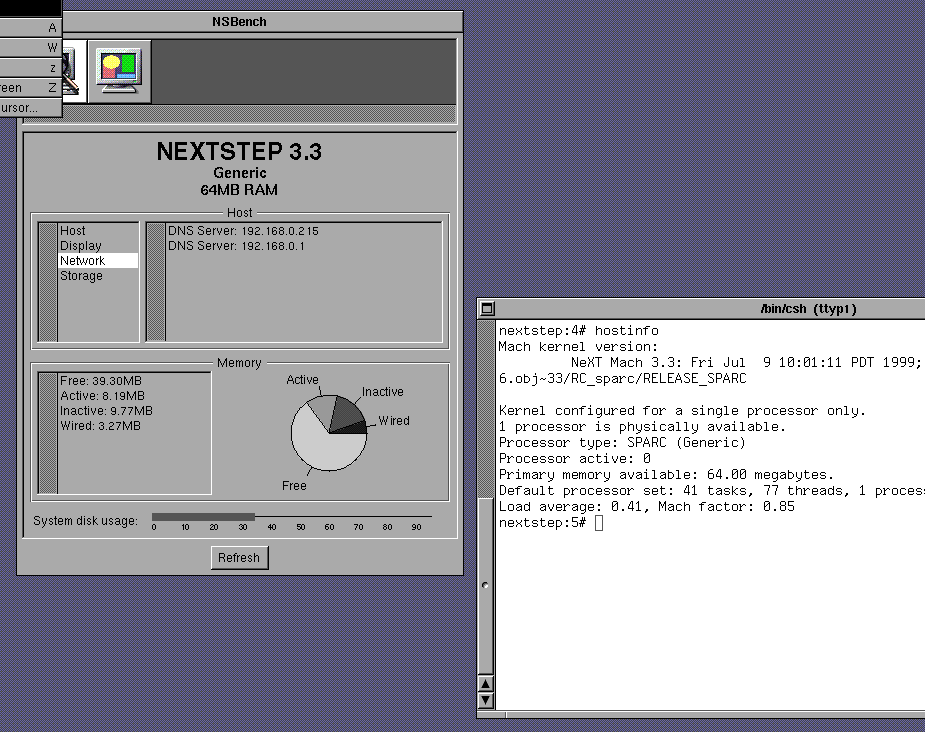
I have no idea of what NXFactor range I should expect - the numbers seem quite low compared to the screenshots above. I ran it twice, first time I had both telnet and FTP sessions running on the background but closing those didn't affect the score much (score went from 2.151028 to 2.153181).
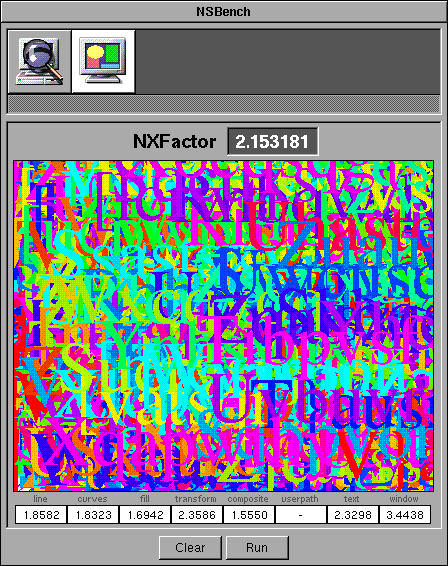
The CPU type appears to get parsed incorrectly as "Generic" on the header but otherwise this looks really nice!
I have no idea of what NXFactor range I should expect - the numbers seem quite low compared to the screenshots above. I ran it twice, first time I had both telnet and FTP sessions running on the background but closing those didn't affect the score much (score went from 2.151028 to 2.153181).
Title: Re: A new benchmark tool
Post by: verdraith on January 30, 2023, 01:20:09 PM
Post by: verdraith on January 30, 2023, 01:20:09 PM
Quote from: MindWalker on January 30, 2023, 11:50:14 AMThe CPU type appears to get parsed incorrectly as "Generic" on the header
Blame NeXT for that ;D
I'll add in some stuff that looks at CPU type as well as CPU subtype. I wonder if it has the same behavior on PA-RISC.
Re NXFactor... ~1 should be a 25MHz '040 Cube with 24MB RAM and grayscale display.
I'm thinking of re-basing '1' to represent an 25MHz '030 NeXTcomputer with 16MB RAM.
Re the number difference... the machine I developed NSBench on is a 4GHz Intel i7, hence the huge numeric difference.
Title: Re: A new benchmark tool
Post by: verdraith on January 30, 2023, 02:21:09 PM
Post by: verdraith on January 30, 2023, 02:21:09 PM
I've added a poll... the results of which will determine the baseline for computing the NXFactor.
Title: Re: A new benchmark tool
Post by: MindWalker on January 30, 2023, 02:51:16 PM
Post by: MindWalker on January 30, 2023, 02:51:16 PM
Quote from: verdraith on January 30, 2023, 01:20:09 PMRe NXFactor... ~1 should be a 25MHz '040 Cube with 24MB RAM and grayscale display.
I'm thinking of re-basing '1' to represent an 25MHz '030 NeXTcomputer with 16MB RAM.
Re the number difference... the machine I developed NSBench on is a 4GHz Intel i7, hence the huge numeric difference.
I'd say basing 1 to the lowest-spec'd real NeXT machine sounds reasonable.
Ok, that CPU makes sense, I just saw it said it was a 486 and was stunned how that could be *that* much faster than my Sparc ;D
Title: Re: A new benchmark tool
Post by: user341 on January 30, 2023, 04:08:31 PM
Post by: user341 on January 30, 2023, 04:08:31 PM
I like making the benchmark the highest pinnacle of black hardware performance released. The turbo next dimension.
The reason being is we can now see what we can achieve beyond the best NeXT ever offered.
Also, I suspect you will get different results if you run it on NS 2.0 vs OS 4.2. I suspect the latest OS will be slower.
Which reminds me of a good test. Loading libraries. For example launching an app in open step like Writeup and closing it are painfully slow, because it seems thick with open step libraries, vs writenow which is mostly assembly if I recall. But some test that times loading a bunch of libraries and dumping them would give you a factor of how slow the OS is. So maybe loading a bunch of heavy objects? Maybe easier said than done. Also, I'm sure this may be easier said than done and not worth the toil.
Anyway, this is a super cool project, thank you for doing it!
The reason being is we can now see what we can achieve beyond the best NeXT ever offered.
Also, I suspect you will get different results if you run it on NS 2.0 vs OS 4.2. I suspect the latest OS will be slower.
Which reminds me of a good test. Loading libraries. For example launching an app in open step like Writeup and closing it are painfully slow, because it seems thick with open step libraries, vs writenow which is mostly assembly if I recall. But some test that times loading a bunch of libraries and dumping them would give you a factor of how slow the OS is. So maybe loading a bunch of heavy objects? Maybe easier said than done. Also, I'm sure this may be easier said than done and not worth the toil.
Anyway, this is a super cool project, thank you for doing it!
Title: Re: A new benchmark tool
Post by: verdraith on January 31, 2023, 04:01:17 AM
Post by: verdraith on January 31, 2023, 04:01:17 AM
Quote from: zombie on January 30, 2023, 04:08:31 PMI like making the benchmark the highest pinnacle of black hardware performance released. The turbo next dimension.I was thinking the same thing. But I can also see how baselines from stock hardware could be used to show the performance benefits of, say, using a Dimension board. In the end, I decided to make it into a poll... I'll go with whatever wins :)
Quote from: zombie on January 30, 2023, 04:08:31 PMAlso, I suspect you will get different results if you run it on NS 2.0 vs OS 4.2.Yes, but probably not for the reason you're thinking.
NXFactor exercises the Display PostScript subsystem, which has the following dependencies:
- Performance of the core DPS subsystem,
- CPU speed,
- RAM access speed,
- Disk seek and read/write speeds (for when stuff gets dumped into swap on systems with low memory.)
In fact, when I run NXBench on Previous configured as a 25MHz '040 Cube with 16MB RAM, I initially get around 240KB of free memory once the OS loads the NSBench program and bundle images into RAM. DPS exercises the swap file when I execute the NXFactor benchmark, which immediately creates a disk I/O bottleneck, which skews the results.
Right now, NSBench is only compiled on NEXTSTEP 3.3, so it will not use any of the OPENSTEP frameworks whatsoever:
Code Select
asmodai@nova:/Users/asmodai/Projects/NSBench/NSBench.app $ uname -a
OPENSTEP nova 4.2 NeXT Mach 4.2: Tue Jan 26 11:21:50 PST 1999; root(rcbuilder):Objects/mk-183.34.4.obj~2/RELEASE_I386 I386 Intel 486
asmodai@nova:/Users/asmodai/Projects/NSBench/NSBench.app $ otool -L NSBench
NSBench:
        /usr/shlib/libMedia_s.A.shlib (minor version 12)
        /usr/shlib/libNeXT_s.C.shlib (minor version 89)
        /usr/shlib/libsys_s.B.shlib (minor version 62)
asmodai@nova:/Users/asmodai/Projects/NSBench/NSBench.app $
I deliberately avoided using MiscKit, Foundation, etc. In fact I even implement my own String class to avoid external dependencies beyond the three linked libraries.So any differing results could -- on a system with 0 load at rest and with sufficient RAM to avoid page faults and swapping -- be placed squarely on the shoulders of anything else other than the OPENSTEP frameworks. There are a lot of other variables at play.
Let's look at the results of both NEXTSTEP 3.3 and OPENSTEP 4.2 running in identically-configured VMware virtual machines (all listed times are in milliseconds.)
| Test | OPENSTEP 4.2 | NEXTSTEP 3.3 |
| Line | 153 | 140 |
| Curve | 78 | 90 |
| Fill | 47 | 40 |
| Transpose | 90 | 50 |
| Composite | 542 | 490 |
| Userpath | 332 | 340 |
| Text | 110 | 120 |
| Window | 107 | 90 |
To give you an idea of how things can skew results, here are the differences between OS 4.2 and OS 4.0 Mecca.
| Test | OPENSTEP 4.2 | OPENSTEP 4.0 'Mecca' |
| Line | 153 | 167 |
| Curve | 78 | 87 |
| Fill | 47 | 55 |
| Transpose | 90 | 89 |
| Composite | 542 | 594 |
| Userpath | 332 | 334 |
| Text | 110 | 113 |
| Window | 107 | 450 |
For anything meaningful to be construed from the differences between NEXTSTEP 3.3, OPENSTEP 4.0, and OPENSTEP 4.2 we would need be aware of the exact differences. The number of variables involved is too great.
Ideally, I should re-factor NSBench so that there are TWO bases. One for NEXTSTEP 3.3, and another for OPENSTEP 4.2. Any port of NSBench to anything else should have a baseline for that thing, e.g. NSBench on NEXTSTEP 2.2 should have a baseline for NEXTSTEP 2.2. In fact, I think that is precisely what I will do.
Benchmarking library load times will also be highly misleading given that loading object files and libraries etc is I/O-bound (disk I/O, memory access speed, swap I/O, etc etc). It wouldn't give an indication of the performance of the kernel itself.
The point you appear to be trying to make -- that OPENSTEP is bloat and is causing loading to be slower -- is confirmation bias. In simple terms, WriteNow would not be loading any OPENSTEP framework whatsoever -- it's linked against libNeXT_s and libsys_s only.
I'd need to dig into the sources to see if `rld' uses ref counting. If it does, then `rld_unload' might not trigger Mach to immediately remove the object from memory as something else could be using it.
It probably does use ref counting, as shared libraries were a big thing in Unix at the time -- the fact that a shared library is kept around in main memory for as long as its needed in order to ensure other programs using the same library do not load the library every time they're executed; with the added bonus that there is less overall memory usage. In simple terms, even if WriteNow made use of OPENSTEP frameworks, they would already be in memory due to Workspace loading them when it starts up.
The speed of an application starting up has many variables and factors, benchmarking those is potentially meaningless, as it could boil down to a mix of cache hits vs misses and the I/O that results from a miss.
Quote from: zombie on January 30, 2023, 04:08:31 PMAnyway, this is a super cool project, thank you for doing it!
It's actually been a lot of fun. I haven't really done any stuff involving Display PostScript before. Most of my code has been with Ye Olde AppKit, OpenStep AppKit/Foundation, and occasionally MiscKit.
I've even managed to write a usable DPS userpath test!
Next step will be CoreMark, which will be interesting to hack up in a portable way. I'm hoping I can use ObjC's List and HashTable alongside plain C linked-lists and hash tables.
It might end up being CoreMark+ObjC, but it ought to be fun nonetheless. :)
Title: Re: A new benchmark tool
Post by: verdraith on January 31, 2023, 04:18:27 AM
Post by: verdraith on January 31, 2023, 04:18:27 AM
Quote from: MindWalker on January 30, 2023, 02:51:16 PMOk, that CPU makes sense, I just saw it said it was a 486 and was stunned how that could be *that* much faster than my Sparc ;D
My original plan was to invoke the wrath of
Code Select
__asm__ __volatile__("cpuid\t\n"...)But, GCC is clever and knows that `cpuid` requires an i586, resulting in an i586 CPU subtype in the Mach-O header, which the Mach loader balks at. I didn't feel like doing low-level assembler hacks, as the values involved in userland could potentially be changed by context switches.
I suspect that in order to do *any* sort of processor identification for either Motorola or Intel CPUs, I'd need to write a Mach kernel module... the question then becomes "is it worth the effort and the risk of killing the kernel dead?". I think the answer to that is "nah."
Maybe one day I'll explore that, but not until I have other stuff done first :)
I'd also need to figure out how that stuff works on SPARC and PA-RISC. I believe SPARC has the CPU type enumerated in the PROM... thankfully, there's kernel sources available so I can find out.
I have no idea how HP did it, though.
-- edit --
Actually, what would be neat is a programmatic way of identifying whether something is running in Previous. It is possible to identify VMware (and possibly other virtualisation software) by peeking at obscure memory addresses (VMware backchannels and the like), so might be neat to have something similar in Previous -- perhaps a value set in an NI directory or something?
Title: Re: A new benchmark tool
Post by: user341 on January 31, 2023, 05:45:03 AM
Post by: user341 on January 31, 2023, 05:45:03 AM
A bit like figuring out we living a simulation or not. Does the network device maybe have a custom name, or could be given one, to make the check easy, or something of that sort.
Title: Re: A new benchmark tool
Post by: verdraith on January 31, 2023, 06:54:18 AM
Post by: verdraith on January 31, 2023, 06:54:18 AM
A lot of stuff on Black hardware is locked away in the kernel, without any means to get at it aside from writing a kernel module.
I don't want to resort to disklabels either, as they can be changed. Any sort of means of identifying as running inside Previous would by necessity have to be independent of any operating system. Maybe there's an unused trap or something re the CPU... something that can be accessed from user mode.
Actually, what happens if one invokes trap with an out-of-bounds callback number? would it fault and cause an illop?
I don't want to resort to disklabels either, as they can be changed. Any sort of means of identifying as running inside Previous would by necessity have to be independent of any operating system. Maybe there's an unused trap or something re the CPU... something that can be accessed from user mode.
Actually, what happens if one invokes trap with an out-of-bounds callback number? would it fault and cause an illop?
Title: Re: A new benchmark tool
Post by: user341 on January 31, 2023, 10:12:27 PM
Post by: user341 on January 31, 2023, 10:12:27 PM
I do not recall if any of the old bench apps had the ability to tell the CPU.
I forget, at boot, post, does the log list the CPU. Maybe you can just scrape from there?
I forget, at boot, post, does the log list the CPU. Maybe you can just scrape from there?
Title: Re: A new benchmark tool
Post by: verdraith on February 01, 2023, 04:02:58 AM
Post by: verdraith on February 01, 2023, 04:02:58 AM
Version 0.2 is now available at https://github.com/Asmodai/NeXT-NSBench/releases/tag/v0.2 (https://github.com/Asmodai/NeXT-NSBench/releases/tag/v0.2)
This version includes my new DPS userpath test, as well as fixing CPU type/subtype lookup so that SPARC now shows as 'SPARC' and not 'Generic'.
This version includes my new DPS userpath test, as well as fixing CPU type/subtype lookup so that SPARC now shows as 'SPARC' and not 'Generic'.
Title: Re: A new benchmark tool
Post by: verdraith on February 01, 2023, 02:12:36 PM
Post by: verdraith on February 01, 2023, 02:12:36 PM
Version 0.3 is now available at https://github.com/Asmodai/NeXT-NSBench/releases/tag/v0.3 (https://github.com/Asmodai/NeXT-NSBench/releases/tag/v0.3)
This version includes a window resize test. Once you've finished the NXFactor testing, the results are viewable via the 'Log...' button.
The NXFactor benchmark is pretty much done. I want to do some UI cleanup and add some graphing to the NXFactor results so there's a visual comparator between your machine, the baseline, other common machines etc.
This version includes a window resize test. Once you've finished the NXFactor testing, the results are viewable via the 'Log...' button.
The NXFactor benchmark is pretty much done. I want to do some UI cleanup and add some graphing to the NXFactor results so there's a visual comparator between your machine, the baseline, other common machines etc.
Title: Re: A new benchmark tool
Post by: verdraith on February 02, 2023, 03:54:57 AM
Post by: verdraith on February 02, 2023, 03:54:57 AM
Started initial work on CoreMark.
The 'simple' variant works.
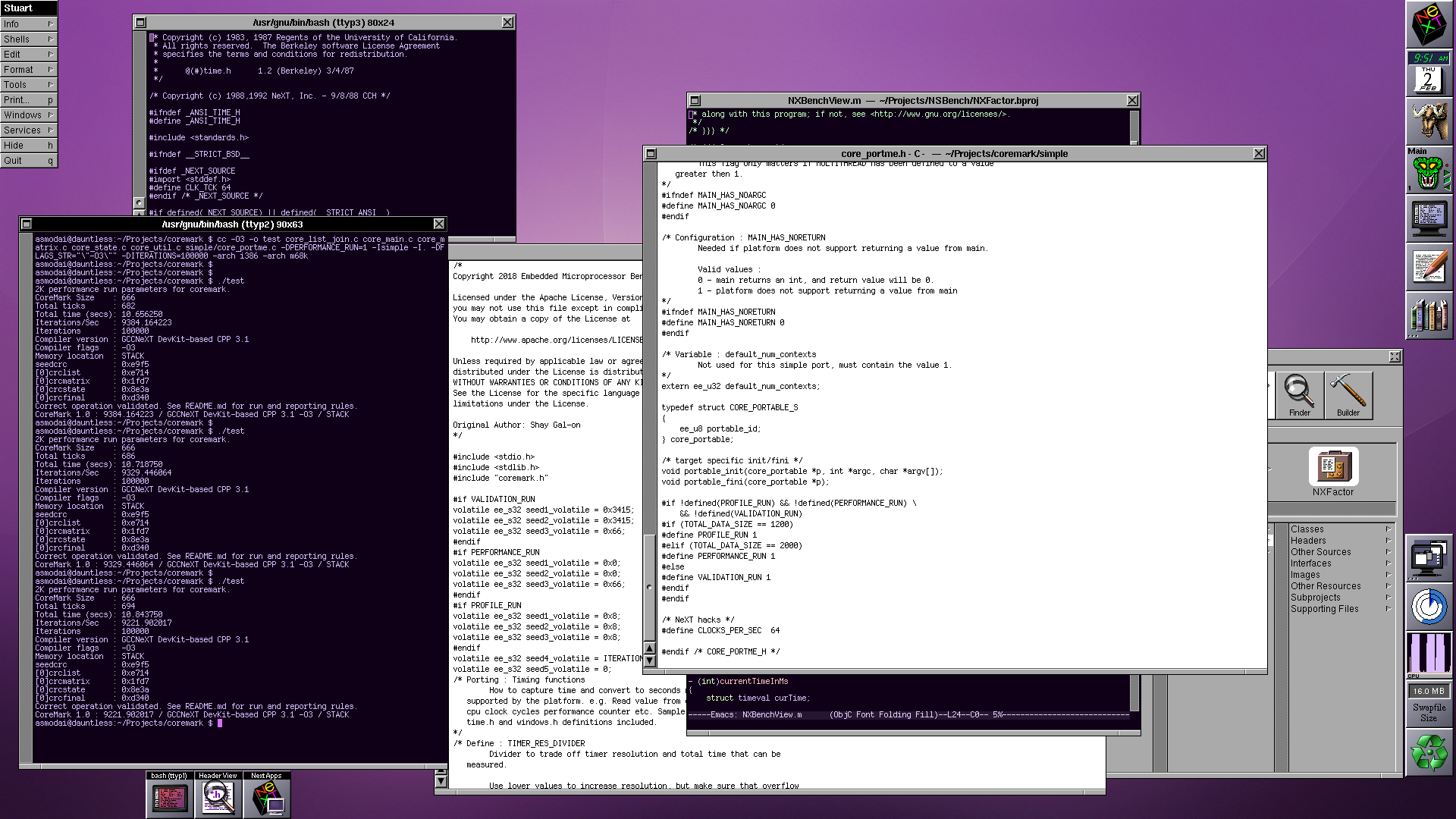
Next steps are to verify timing (so I don't end up with a benchmark that takes days to run on m68k) and get it using the NXZone variants of `malloc`/`free` et al.
The 'simple' variant works.
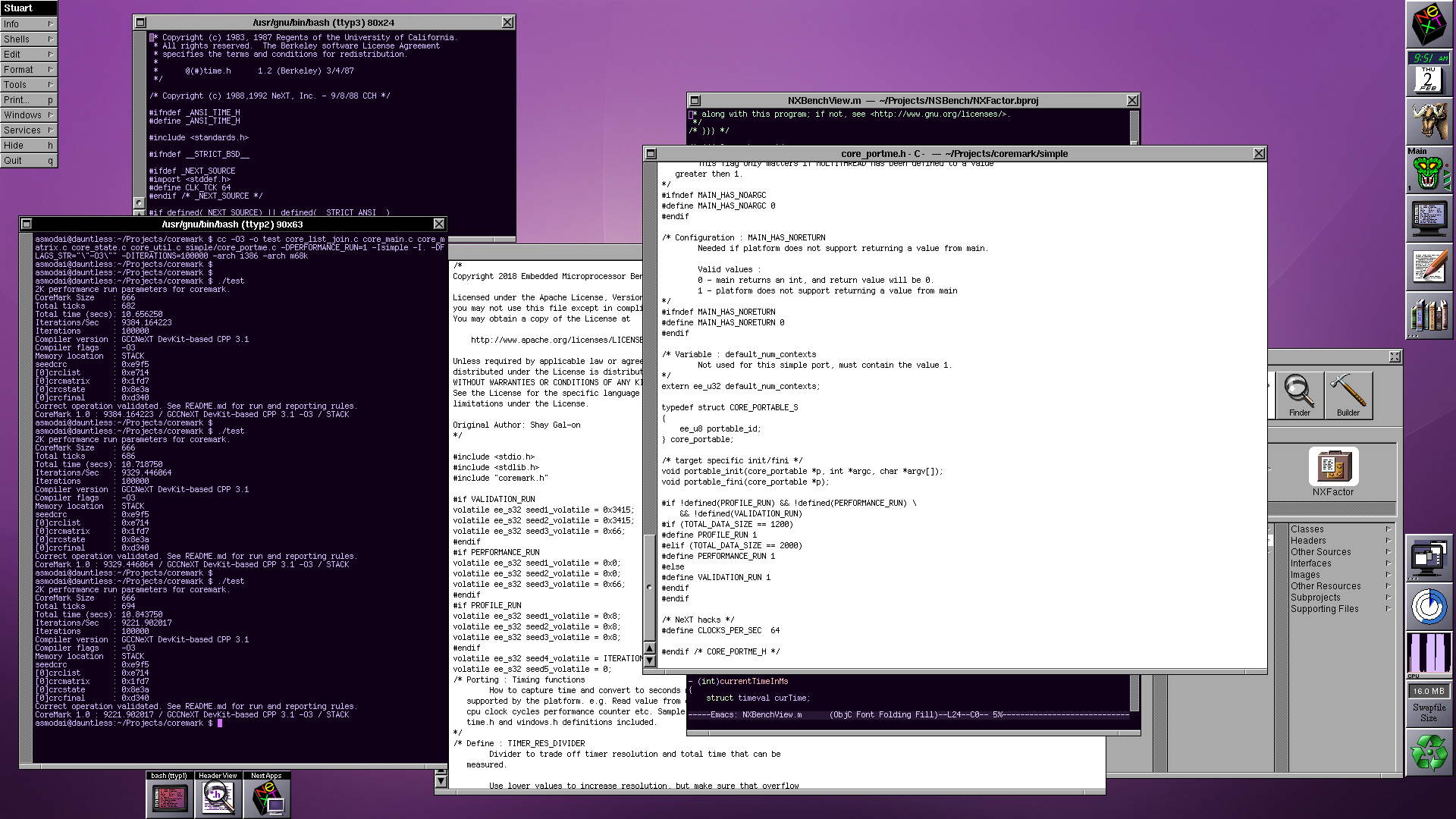
Next steps are to verify timing (so I don't end up with a benchmark that takes days to run on m68k) and get it using the NXZone variants of `malloc`/`free` et al.
Title: Re: A new benchmark tool
Post by: verdraith on February 03, 2023, 04:57:57 AM
Post by: verdraith on February 03, 2023, 04:57:57 AM
So, there's a huge caveat with CoreMark that I think needs to be highlighted.
I'll need to modify CoreMark's main routine, which is a big no-no with regards to sending results to EEMBC.
Due to the massive disparity in processor speeds involved here -- from 25MHz to 4GHz and beyond -- I need wrapper code that computes the number of benchmark iterations that can be performed in one second. This value is then multiplied so that the actual test takes 25 seconds.
This means now that the main routine should take and return a structure with various bits of info that gets passed back up the chain to the test runner, as opposed to the current method where the number of iterations is a compile-time constant.
This invalidates the CoreMark results as far as submissions to the EEMBC go.
I'm going to fork CoreMark into NeXTMark to highlight that the result should not be submitted to anyone but, well, I guess us.
I'll need to modify CoreMark's main routine, which is a big no-no with regards to sending results to EEMBC.
Due to the massive disparity in processor speeds involved here -- from 25MHz to 4GHz and beyond -- I need wrapper code that computes the number of benchmark iterations that can be performed in one second. This value is then multiplied so that the actual test takes 25 seconds.
This means now that the main routine should take and return a structure with various bits of info that gets passed back up the chain to the test runner, as opposed to the current method where the number of iterations is a compile-time constant.
This invalidates the CoreMark results as far as submissions to the EEMBC go.
I'm going to fork CoreMark into NeXTMark to highlight that the result should not be submitted to anyone but, well, I guess us.
Title: Re: A new benchmark tool
Post by: MindWalker on February 03, 2023, 03:21:09 PM
Post by: MindWalker on February 03, 2023, 03:21:09 PM
Tested 0.3 on my mono NeXTstation - working as expected. From the scores it seems that the NeXTstep's drivers for the Sparc graphics are not that fast...
That "Don't panic" message ;D
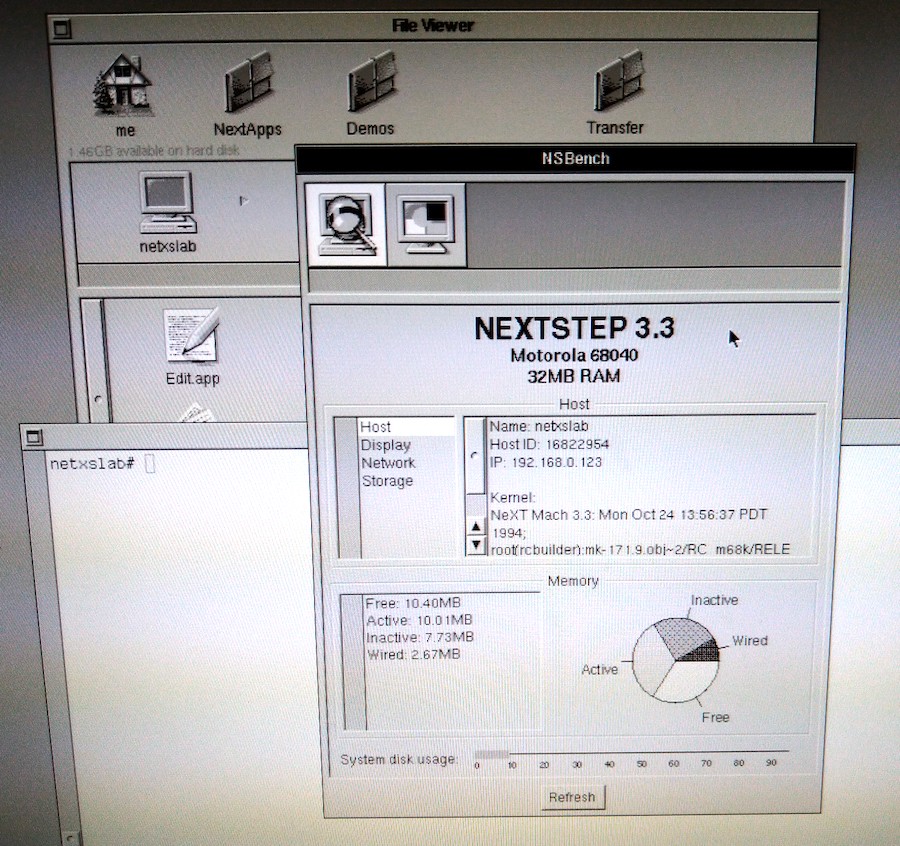
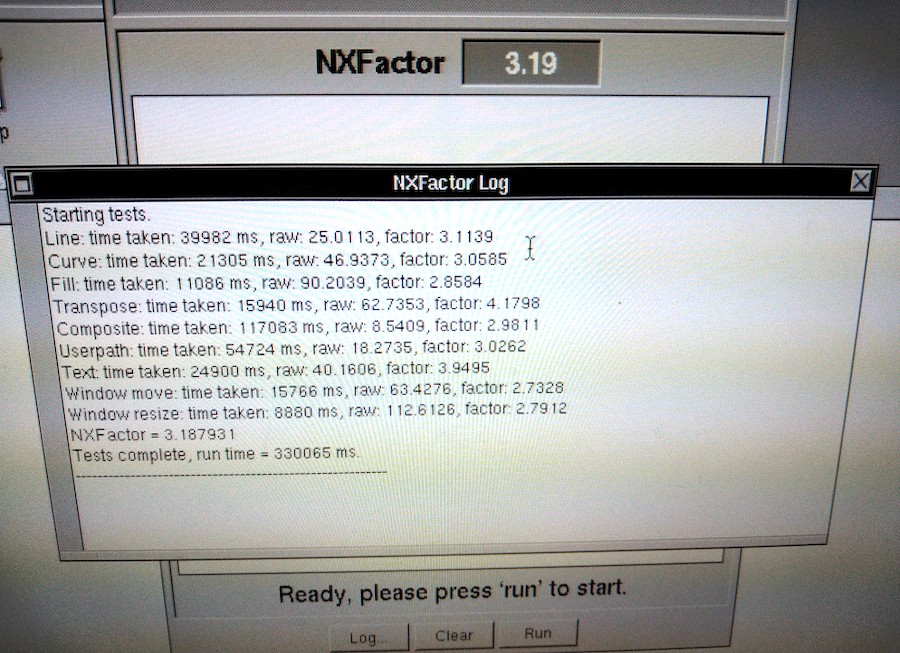
That "Don't panic" message ;D
Title: Re: A new benchmark tool
Post by: verdraith on February 03, 2023, 04:28:36 PM
Post by: verdraith on February 03, 2023, 04:28:36 PM
I love that there appears to be a typo in the hostname :)
The next version I release will give more detailed information on what is going on with the Display PostScript stuff: i.e.
'App' is how much drawing time was spent in the actual app, and 'server' is drawing time spent in the DPS server.
The next version I release will give more detailed information on what is going on with the Display PostScript stuff: i.e.
Code Select
Starting tests.
Line: time taken: 380 ms, raw: 2631.5789, factor: 327.6328
Timer 1: Trials: 10000  App: 0.0200s  Server: 0.1280s  ServerPct: 86.49  Total: 0.1480s

Curve: time taken: 190ms, raw: 5263.1579, factor: 342.9527
Timer 1: Trials: 5000  App: 0.0200s  Server: 0.0960s  ServerPct: 82.76  Total: 0.1160s

Fill: time taken: 170 ms, raw: 5882.3529, factor: 186.3999
Timer 1: Trials: 5000  App: 0.0200s  Server: 0.0640s  ServerPct: 76.19  Total: 0.0840s

Transpose: time taken: 90 ms, raw: 11111.1111, factor: 740.2867
Timer 1: Trials: 150  App: 0.0000s  Server: 0.0800s  ServerPct: 100.00  Total: 0.0800s

Composite: time taken: 740 ms, raw: 1351.3514, factor: 471.6759
Timer 1: Trials: 10000  App: 0.0300s  Server: 0.4960s  ServerPct: 94.30  Total: 0.5260s

Userpath: time taken: 560 ms, raw: 1785.7143, factor: 295.7215
Timer 1: Trials: 10000  App: 0.0100s  Server: 0.3200s  ServerPct: 96.97  Total: 0.3300s

Text: time taken: 310 ms, raw: 3225.8065, factor: 317.2352
Timer 1: Trials: 10000  App: 0.0100s  Server: 0.1120s  ServerPct: 91.80  Total: 0.1220s

Window move: time taken: 170 ms, raw: 5882.3529, factor: 253.4415
Timer 1: Trials: 1100  App: 0.0000s  Server: 0.1600s  ServerPct: 100.00  Total: 0.1600s

Window resize: time taken: 70 ms, raw: 14285.7143, factor: 354.0853
Timer 1: Trials: 81  TotalWall: 0.070001

NXFactor = 365.492401
Tests complete, run time = 10760 ms.
---------------------------------------------------------
'App' is how much drawing time was spent in the actual app, and 'server' is drawing time spent in the DPS server.
Title: Re: A new benchmark tool
Post by: verdraith on February 03, 2023, 08:27:41 PM
Post by: verdraith on February 03, 2023, 08:27:41 PM
Version 0.4 is now available.
DPS engine metrics are collected and displayed in the NXFactor log window, and.... CoreMark!
Quad-fat binary is available at https://github.com/Asmodai/NeXT-NSBench/releases/tag/v0.4 (https://github.com/Asmodai/NeXT-NSBench/releases/tag/v0.4)
DPS engine metrics are collected and displayed in the NXFactor log window, and.... CoreMark!
Quad-fat binary is available at https://github.com/Asmodai/NeXT-NSBench/releases/tag/v0.4 (https://github.com/Asmodai/NeXT-NSBench/releases/tag/v0.4)
Title: Re: A new benchmark tool
Post by: andreas_g on February 05, 2023, 01:47:13 AM
Post by: andreas_g on February 05, 2023, 01:47:13 AM
I've just run the NXFactor test in Previous (25 MHz 68030, 64 MB). I got an NXFactor of 0,96. Did you normalize the test using real hardware or did you use Previous?
Title: Re: A new benchmark tool
Post by: verdraith on February 05, 2023, 05:34:48 AM
Post by: verdraith on February 05, 2023, 05:34:48 AM
I used Previous 2.6 (softfloat branch) compiled on my GNU/Linux laptop for the time being as I don't own any NeXT hardware (yet).
I'd expect there to be some variance, as the DPS system has quite a few variables that can affect the result. Can you DM me the NXFactor result log?
Looks like the 25MHz 68030 cube is winning the poll, so I'll want someone to run it on that and give me the NXFactor and NXMark results at some point :)
I'd expect there to be some variance, as the DPS system has quite a few variables that can affect the result. Can you DM me the NXFactor result log?
Looks like the 25MHz 68030 cube is winning the poll, so I'll want someone to run it on that and give me the NXFactor and NXMark results at some point :)
Title: Re: A new benchmark tool
Post by: andreas_g on February 05, 2023, 05:49:30 AM
Post by: andreas_g on February 05, 2023, 05:49:30 AM
Previous is quite accurate in simulating many parts of NeXT hardware. The one point it is definitely not correct is timings. I do not recommend using Previuos as reference for anything related to timings.
Title: Re: A new benchmark tool
Post by: verdraith on February 05, 2023, 05:56:11 AM
Post by: verdraith on February 05, 2023, 05:56:11 AM
Yes, that's a given -- no benchmarking software should ever use a simulated or emulated platform as the baseline unless the simulation or emulation is proven to be 100% accurate and bug-compatible.
But, for the time being, the numbers being provided by Previous are not problematic, as this is all still alpha-quality software.
If anyone owns a 25MHz '030, please DM me so baseline test criteria can be established (e.g. running NXFactor a few times).
But, for the time being, the numbers being provided by Previous are not problematic, as this is all still alpha-quality software.
If anyone owns a 25MHz '030, please DM me so baseline test criteria can be established (e.g. running NXFactor a few times).
Title: Re: A new benchmark tool
Post by: crimsonRE on February 07, 2023, 09:21:38 AM
Post by: crimsonRE on February 07, 2023, 09:21:38 AM
I will try to run this on my '030 Cube at some point in the next couple of days if possible, sir!
Title: Re: A new benchmark tool
Post by: verdraith on February 07, 2023, 09:40:10 AM
Post by: verdraith on February 07, 2023, 09:40:10 AM
Awesome. I've asked Rob if he can run some stuff too.
Here's the suggested hardware:
The protocol:
At all stages, allow a sufficient gap between each execution for the 5 minute load average to reduce to 0. This would usually be between 5 to 6 minutes of no activity.
Here's the suggested hardware:
| CPU | 25MHz '030 NeXT Computer |
| RAM | 16MB |
| OS | NEXTSTEP 3.3 (fully patched if possible) |
| HDD | spinning metal disk, if possible |
The protocol:
- Ensure no other app is running (not even Preferences). Hide Workspace, and command-double-click the NSBench icon.
- Run NXFactor benchmark 3 times. Provide full log output for all 3 runs. Averages will be taken.
- Run NXMark (CoreMark) 3 times. Provide total scores for all 3 runs. Average will be taken.
- Do a little dance. Do another little dance. Average performance will be taken.
- Submit results to me via DM or as a reply to this thread.
At all stages, allow a sufficient gap between each execution for the 5 minute load average to reduce to 0. This would usually be between 5 to 6 minutes of no activity.
Title: Re: A new benchmark tool
Post by: user341 on February 07, 2023, 03:21:59 PM
Post by: user341 on February 07, 2023, 03:21:59 PM
If we're going with the original cube, it only had 8MB of storage and only the magneto optical? Why not make that the benchmark?
Title: Re: A new benchmark tool
Post by: verdraith on February 07, 2023, 05:11:41 PM
Post by: verdraith on February 07, 2023, 05:11:41 PM
How many people still use an OD, I wonder.
Will NeXTSTEP 3.3 fit on an OD with enough usable space for the swap file?
A 25MHz '030 with 16MB RAM and a SCSI HDD is the 'server' configuration that NeXT offered. I feel that's a more reasonable baseline given that most people probably own tricked out black hardware by now :)
Will NeXTSTEP 3.3 fit on an OD with enough usable space for the swap file?
A 25MHz '030 with 16MB RAM and a SCSI HDD is the 'server' configuration that NeXT offered. I feel that's a more reasonable baseline given that most people probably own tricked out black hardware by now :)
Title: Re: A new benchmark tool
Post by: user341 on February 07, 2023, 05:39:04 PM
Post by: user341 on February 07, 2023, 05:39:04 PM
Yes, NS fit on an OD. NS had to fit on 105MB HD because that became the entry level for slabs.
Title: Re: A new benchmark tool
Post by: verdraith on February 07, 2023, 05:48:34 PM
Post by: verdraith on February 07, 2023, 05:48:34 PM
You missed the qualifier on that question.
Hint: with 8MB of RAM, the swap will grow beyond 16MB after first boot. It could grow as high as 60MB once the NXFactor benchmark has finished.
Hint: with 8MB of RAM, the swap will grow beyond 16MB after first boot. It could grow as high as 60MB once the NXFactor benchmark has finished.
Title: Re: A new benchmark tool
Post by: verdraith on February 07, 2023, 06:42:50 PM
Post by: verdraith on February 07, 2023, 06:42:50 PM
Actually, sorry, seems I was wrong.
After seeing just how much room would remain on an OD with just the base of NS3.3 installed, I noticed that it builds the disk with custom minfree value.
Usually, newfs wants at least 10% of the disk as a buffer zone, so when you reach 100% disk usage, you're actually at 91% disk usage -- a trick that tries to avoid data loss, and to give the admins time to deal with the situation.
Seems at ~68MB, a base install leaves plenty of disk for a 60MB swap file. I'll see just how much as soon as BuildDisk finishes and I can boot off it.
After seeing just how much room would remain on an OD with just the base of NS3.3 installed, I noticed that it builds the disk with custom minfree value.
Usually, newfs wants at least 10% of the disk as a buffer zone, so when you reach 100% disk usage, you're actually at 91% disk usage -- a trick that tries to avoid data loss, and to give the admins time to deal with the situation.
Seems at ~68MB, a base install leaves plenty of disk for a 60MB swap file. I'll see just how much as soon as BuildDisk finishes and I can boot off it.
Title: Re: A new benchmark tool
Post by: user341 on February 07, 2023, 07:17:22 PM
Post by: user341 on February 07, 2023, 07:17:22 PM
Quote from: verdraith on February 07, 2023, 05:48:34 PMYou missed the qualifier on that question.
Hint: with 8MB of RAM, the swap will grow beyond 16MB after first boot. It could grow as high as 60MB once the NXFactor benchmark has finished.
You do not have to give me a hint. I had and used a base machine for quite a while. I worked at NeXT. I remember when we had to add a 40MB hard drive to the optical cube just to help with the swap performance.That was sold as a 'no cost' bonus for a little time.
The base magneto optical only machine weirdly worked well. You could not do a lot of multitasking. But it did work. Weirdly reminded me of my experience with a base 128k Mac when it first came out.
And space was not the problem. Lame performance of the optical drive really was the bottleneck. But.... It was fascinating just how well it worked considering the weird chunky tech.
Next's DMA chip was really something special for its time (and quite a bit of time beyond release it was still superior to most everything out there in how well the optical drive did not bottle neck as much as it would on other systems--I remember moving to intel and that subsystem still was superior to the otherwise way faster intel hardware).
Title: Re: A new benchmark tool
Post by: verdraith on February 07, 2023, 07:58:50 PM
Post by: verdraith on February 07, 2023, 07:58:50 PM
Quote from: zombie on February 07, 2023, 07:17:22 PMYou do not have to give me a hint. I had and used a base machine for quite a while. I worked at NeXT. I remember when we had to add a 40MB hard drive to the optical cube just to help with the swap performance.That was sold as a 'no cost' bonus for a little time.
And I think that was a mistake with the NeXT Computer at launch. I think there should have been a faster dedicated backing-store / swapfile drive in the machine alongside the OD.
Having grown up in the 'real' Unix world of swap slices, using the rule of thumb of 'your swap slice is twice the amount of physical RAM', I've seen what happens when you run out of swap. Even now I grind my teeth when I see someone build any sort of Unix or Unix-like system with no swap slice.
Conversely, I've seen what happens when you run out of disk space due to a swap file. On both NeXT and macOS. At least these days macOS forces you to reboot -- found that out after Emacs managed to generate 75 gigabytes of swapfile thanks to flycheck-mode not clearing its buffer when I got to code-review 10,000+ lines of PHP.
Quote from: zombie on February 07, 2023, 07:17:22 PMThe base magneto optical only machine weirdly worked well. You could not do a lot of multitasking. But it did work. Weirdly reminded me of my experience with a base 128k Mac when it first came out.
The idea that you take your entire install with you on a removable disk was an awesome idea, and I'm kinda sad it didn't catch on at the time. The hardware could have matured. I mean, we could practically do the same thing in the late 90s thanks to USB. I think if swap had been on its own dedicated device outside of the OD, things would have been better.
Imagine if you could go back in time and show engineers what USB can do.
Quote from: zombie on February 07, 2023, 07:17:22 PMAnd space was not the problem. Lame performance of the optical drive really was the bottleneck. But.... It was fascinating just how well it worked considering the weird chunky tech.
I feel a lot of things were clunky back then... clunky but worked weirdly well -- like the DG AViiON allowing you to share one SCSI disk between two machines.
Anyway, I made an incorrect assumption on newfs and base install size, and assumed the OD would not have enough remaining space for swap.
My test install leaves ~140MB... so that's ~80MB with a worst-case swapfile of 60MB.
So, there's no reason why the baseline couldn't be done with 8MB and an OD... the question is simply: is there anyone with a working OD?
On a separate note, I think I'm going to modify and use `iozone` for the disk benchmarking -- ~80MB is enough for iozone to write out a 42MB test file.
Title: Re: A new benchmark tool
Post by: Rob Blessin Black Hole on February 07, 2023, 09:21:53 PM
Post by: Rob Blessin Black Hole on February 07, 2023, 09:21:53 PM
Here is a great doc on all aspects of the swap file in NeXTSTEP hopefully it will help :). I remember having to clear the swap file back in the day when ram pricing was in the stratosphere and we were testing the limits of NeXT hardware and software . I was actually using it in a work environment and the 3rd party products and NeXT email made it so easy. Once we had everything set up. So the swapfile would build up because I was toggling between 7 or 8 apps on a color station all day... the intel boxes afforded faster processing and more ram . The integration on the NeXT 68K hardware was and still is amazing. https://www.nextcomputers.org/NeXTfiles/Docs/FAQ/Swapfiles/TjL's%20Swapfile%20&%20Swapdisk%20FAQ.pdf
Title: Re: A new benchmark tool
Post by: barcher174 on February 07, 2023, 11:25:13 PM
Post by: barcher174 on February 07, 2023, 11:25:13 PM
Both working optical disks -and- original 5.25" hdds that have not degraded are going to be in very short supply. I feel like we're splitting hairs on the baseline. An original 68030 w/ any standard hdd and 16mb of ram should be totally reasonable considering the target will be either NS3.3 or OS4.2. Most still in service cubes would have ditched the MO only config by that time anyway.
Title: Re: A new benchmark tool
Post by: barcher174 on February 07, 2023, 11:27:09 PM
Post by: barcher174 on February 07, 2023, 11:27:09 PM
Also very nice looking app. I'm particularly interested in how some of my more exotically upgraded sun machines will compare.
Title: Re: A new benchmark tool
Post by: user341 on February 08, 2023, 12:52:10 AM
Post by: user341 on February 08, 2023, 12:52:10 AM
Quote from: barcher174 on February 07, 2023, 11:25:13 PMBoth working optical disks -and- original 5.25" hdds that have not degraded are going to be in very short supply. I feel like we're splitting hairs on the baseline. An original 68030 w/ any standard hdd and 16mb of ram should be totally reasonable considering the target will be either NS3.3 or OS4.2. Most still in service cubes would have ditched the MO only config by that time anyway.
I really regret selling my old cube back in the day. I had an original optical drive and I had a really great cleaning kit for it that I used. It worked great and never had a bit of trouble with and I did use it as the main and SOLE boot drive for a good while.
Do not get me wrong, when I was finally able to afford the 660MB maxtor hard drive from next (and I think it cost around $3000 back in the day, so not cheap), it was like the heavens parted. While it was shocking the machine could work only with a magnetoOptical drive, you never wanted to run the machine that way.
As for why split hairs, well if not, why not put in a loaded max next turbo dimension? And should we test it with an SSD plugged into the SCSI bus instead because that's no longer practical? I could see an argument for being very origin story, and very 'end of story' for the benchmark.
In that this X times faster than how the first NeXT was. Or X times faster than the best NeXT machine there ever was. Kind of a cool factor either way.
As for in between, it's fine, and obviously up to the developer, but just seems somehow less informative than either of those extreme cases. Just my view. Reasonable folks can and will differ.
As always, YMMV.
Title: Re: A new benchmark tool
Post by: barcher174 on February 08, 2023, 08:39:22 PM
Post by: barcher174 on February 08, 2023, 08:39:22 PM
I had the thought maybe we could use the minimum system requirements for NS 3.3, but I can't find any mention of them (RAM, HDD size) in the install docs. I guess they were never published for black hardware?
Title: Re: A new benchmark tool
Post by: user341 on February 08, 2023, 08:44:05 PM
Post by: user341 on February 08, 2023, 08:44:05 PM
Quote from: barcher174 on February 08, 2023, 08:39:22 PMI had the thought maybe we could use the minimum system requirements for NS 3.3, but I can't find any mention of them (RAM, HDD size) in the install docs. I guess they were never published for black hardware?
I remember them and it would still run on a base 8MB 030 optical cube. You would not WANT to run it on that, but it would run.
Title: Re: A new benchmark tool
Post by: Rob Blessin Black Hole on February 08, 2023, 09:41:12 PM
Post by: Rob Blessin Black Hole on February 08, 2023, 09:41:12 PM
Quote from: zombie on February 08, 2023, 08:44:05 PMI remember them and it would still run on a base 8MB 030 optical cube. You would not WANT to run it on that, but it would run.We played a good prank on a kid last year with his Dad code name Gman . The kid negotiated the price with me and everything else fun stuff :)
Here is Neal Drive lol 68030 25Mhz with only 4Mb of ram https://youtu.be/d_JvmIGY1uw so his hobby was making frame by frame models moving the clay characters a frame at a time a little at a time. This cube may actually have run slower than making a frame by frame animated movie. Now his Dad's Code name Gman was much much faster and you guessed it. In the end Gman's Cube was Neal's we updated everything for him ram, motherboard and sd :) He was very excited to receive it with the upgrades on his birthday.! Here was the final Cube https://youtu.be/DZxWCJj0j7o
Title: Re: A new benchmark tool
Post by: wlewisiii on February 09, 2023, 01:37:32 PM
Post by: wlewisiii on February 09, 2023, 01:37:32 PM
So out of curiosity I downloaded and ran the benchmark on my Previous installations:
Previous 2.7/Linux Mint: 68040/33 Turbo Color with 128mb assigned. Factor 3.08 Mark 26.12
AMD Ryzen 3 3350U 2.1 Ghz 16gb ram
Previous 2.5/Windows 10: 68040/33 Turbo Color with 128mb assigned. Factor 3.15 Mark 26.13
AMD Ryzen 5 2400G with Radeon Vega Graphics 3.60 GHz, 16 gb ram
I now wish I could see numbers from a real Turbo Color :)
Previous 2.7/Linux Mint: 68040/33 Turbo Color with 128mb assigned. Factor 3.08 Mark 26.12
AMD Ryzen 3 3350U 2.1 Ghz 16gb ram
Previous 2.5/Windows 10: 68040/33 Turbo Color with 128mb assigned. Factor 3.15 Mark 26.13
AMD Ryzen 5 2400G with Radeon Vega Graphics 3.60 GHz, 16 gb ram
I now wish I could see numbers from a real Turbo Color :)
Title: Re: A new benchmark tool
Post by: crimsonRE on February 13, 2023, 10:02:10 AM
Post by: crimsonRE on February 13, 2023, 10:02:10 AM
Ran the benchmarks last night on my '030 NeXT Computer with 64MB RAM (am not up for dismantling the computer to drop it to 16MB) and the original 660MB HDD - I'll send the results on to Paul this evening (I hope). I have a 25MHz 040 monostation, a TurboColor and a 110MHz SPARCstation5 on which to run the benchmarks as well...
Title: Re: A new benchmark tool
Post by: verdraith on February 14, 2023, 10:33:54 AM
Post by: verdraith on February 14, 2023, 10:33:54 AM
I'm tempted to remove the baseline and instead just have a collection of results from various configurations.
Idea being that after NXFactor runs, it presents a bar chart comparing n known configurations with which to compare against the host on which the benchmark has been ran -- where n is a number between 1 and however many bars I can fit into the display area.
This moots the entire argument over what the ideal baseline should be.
I'm tempted to expand this idea beyond NXFactor bundle and make it a feature of the app, so that any benchmark bundle result can be compared.
For this to work, though, it's imperative that I have the complete NXFactor log, as that gives the raw non-normalised results :)
The CoreMark result is not normalised, so the results of that are fine on their own.
Also working on integrating iozone into the Disk I/O benchmark in a way such that individual disks can be benchmarked. I'll post an update when that's ready to go.
Idea being that after NXFactor runs, it presents a bar chart comparing n known configurations with which to compare against the host on which the benchmark has been ran -- where n is a number between 1 and however many bars I can fit into the display area.
This moots the entire argument over what the ideal baseline should be.
I'm tempted to expand this idea beyond NXFactor bundle and make it a feature of the app, so that any benchmark bundle result can be compared.
For this to work, though, it's imperative that I have the complete NXFactor log, as that gives the raw non-normalised results :)
The CoreMark result is not normalised, so the results of that are fine on their own.
Also working on integrating iozone into the Disk I/O benchmark in a way such that individual disks can be benchmarked. I'll post an update when that's ready to go.
Title: Re: A new benchmark tool
Post by: spitfire on February 14, 2023, 06:46:01 PM
Post by: spitfire on February 14, 2023, 06:46:01 PM
> Idea being that after NXFactor runs, it presents a bar chart comparing n known configurations with which to compare against the host on which the benchmark has been ran -- where n is a number between 1 and however many bars I can fit into the display area.
The Amiga benchmark sysinfo does this. Displays your relative performance next to a bunch of different systems.
The Amiga benchmark sysinfo does this. Displays your relative performance next to a bunch of different systems.
Title: Re: A new benchmark tool
Post by: nuss on February 17, 2023, 01:48:37 PM
Post by: nuss on February 17, 2023, 01:48:37 PM
Just wanted to add, that I also do like the Amiga sysinfo approach of comparing to different known systems :)
Title: Re: A new benchmark tool
Post by: MindWalker on December 09, 2023, 03:39:21 PM
Post by: MindWalker on December 09, 2023, 03:39:21 PM
Testing my new HP 712/60, here are the results (NXFactor 4.22). Not pictured but the CPU type shows correctly as "HP PA-RISC 7100LC" (as there was some wonder about that on post #16).
EDIT: later on I realized this was done running at highest color mode, dropping down to 256 colours got me much better results (6.04 - 6.49), see later post #59.
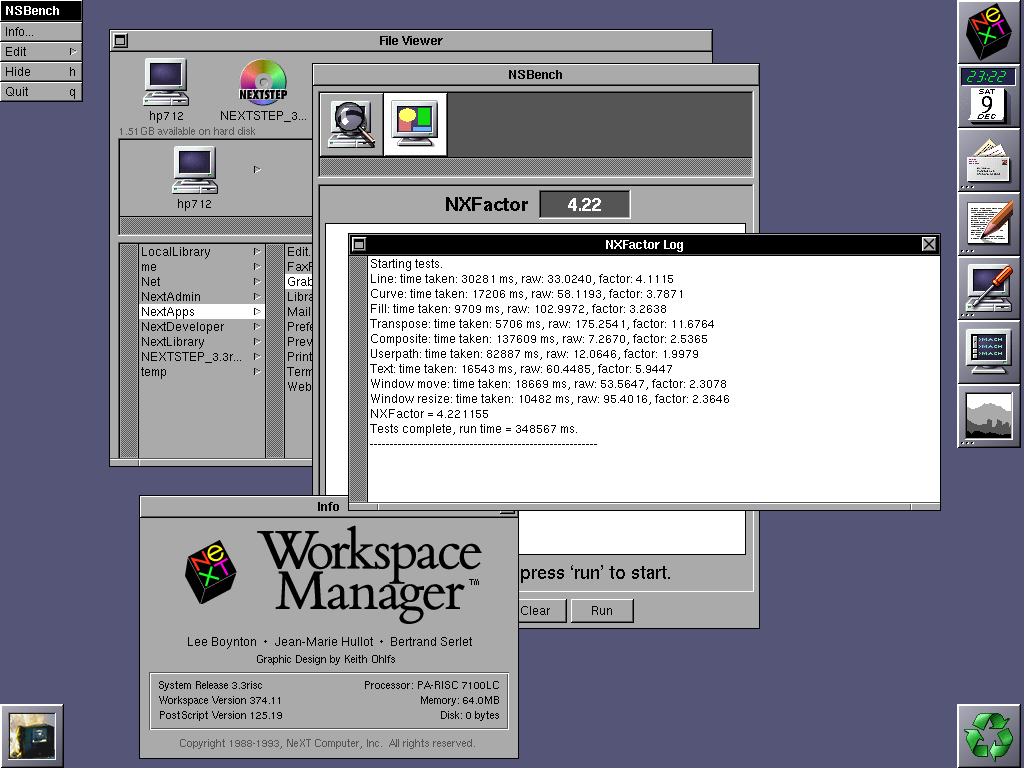
EDIT: later on I realized this was done running at highest color mode, dropping down to 256 colours got me much better results (6.04 - 6.49), see later post #59.
Title: Re: A new benchmark tool
Post by: Apple2guy on December 10, 2023, 09:11:01 PM
Post by: Apple2guy on December 10, 2023, 09:11:01 PM
NXfactor plus a few others.. on a i7 2600 running Openstep 4.2
If you're gonna do it, Overdo it! 8)
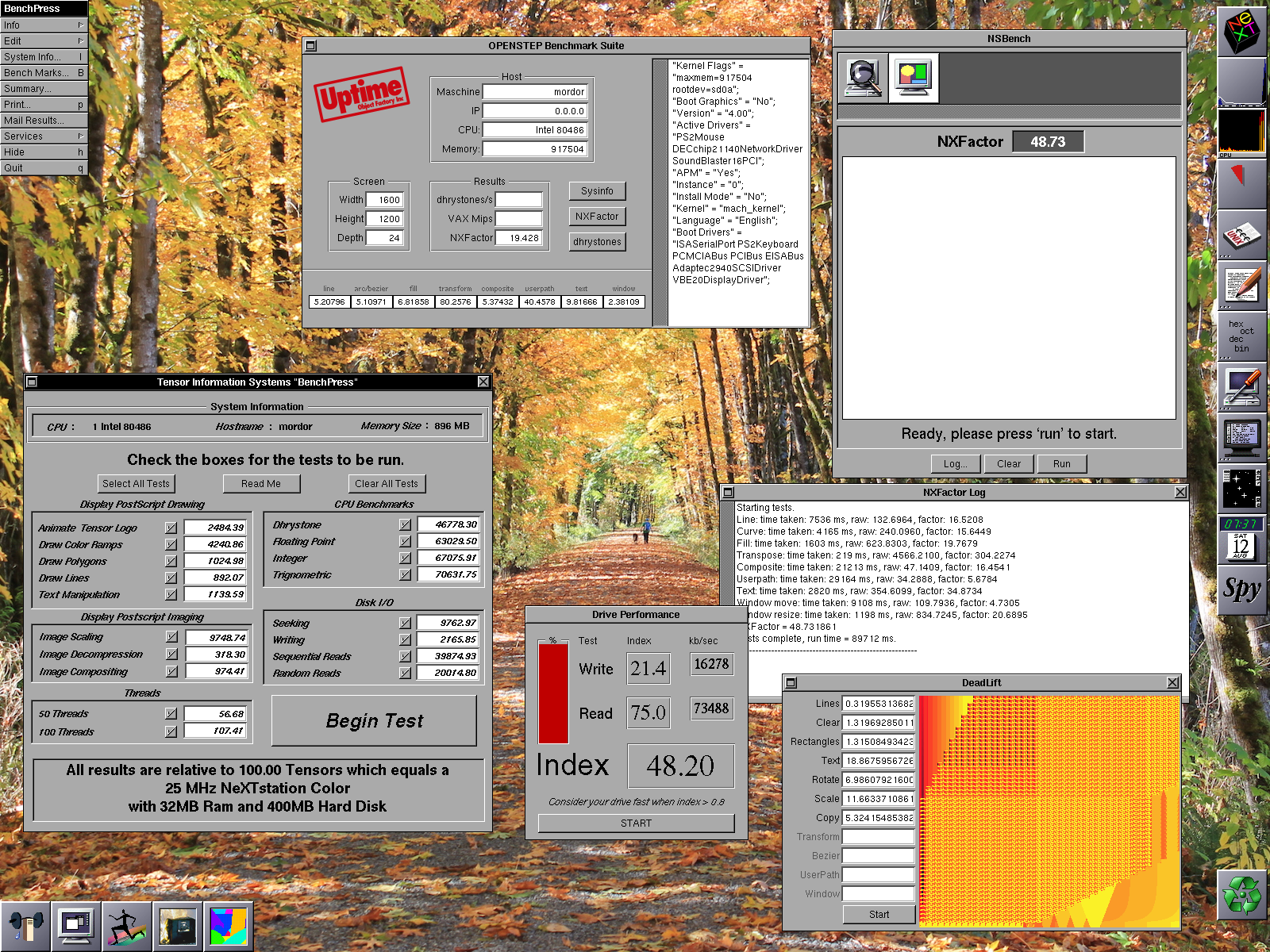
If you're gonna do it, Overdo it! 8)
Title: Re: A new benchmark tool
Post by: compu85 on December 17, 2023, 01:06:00 AM
Post by: compu85 on December 17, 2023, 01:06:00 AM
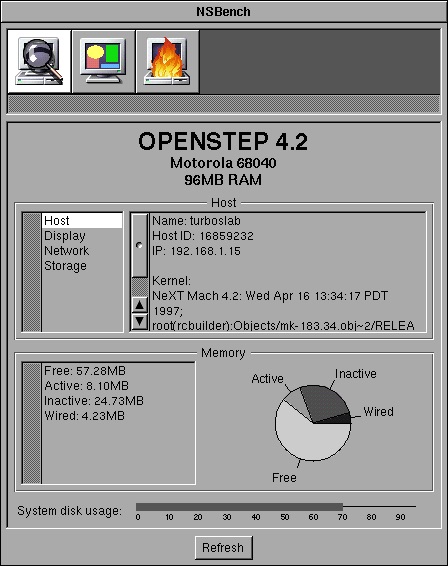
I was curious how much of a performance hit OpenStep 4.2 would be vs. NextStep 3.3 on my Turbo Color slab (w/ ADB, 96mb ram, and 1gb Seagate hdd). I ran NS bench on 3.3, upgraded to 4.2, and ran the tests again.
NxMarks:
33.25 | 33.21
33.25 | 33.22
33.25 | 33.20
NxFactor:
2.19 | 2.05
2.22 | 2.05
2.22 | 2.05
So, there is a slight slowdown. But it doesn't seem dramatic. OmniWeb 3 runs much faster than OmniWeb2!
-J
NxMarks:
33.25 | 33.21
33.25 | 33.22
33.25 | 33.20
NxFactor:
2.19 | 2.05
2.22 | 2.05
2.22 | 2.05
So, there is a slight slowdown. But it doesn't seem dramatic. OmniWeb 3 runs much faster than OmniWeb2!
-J
Title: Re: A new benchmark tool
Post by: compu85 on December 18, 2023, 10:24:07 AM
Post by: compu85 on December 18, 2023, 10:24:07 AM
A folow up after using OS 4.2 on a Turbo Color slab for a few days: Some things are for sure slower.
Scrolling file windows chugs a bit. But once loaded programs seem to run about the same. Dragging large file windows around has more tearing than before.
Some positives: The kerning on some fonts I've installed works much better. And of course more apps are available.
Also, I'm posting this from OmniWeb 3 on the Slab!
Scrolling file windows chugs a bit. But once loaded programs seem to run about the same. Dragging large file windows around has more tearing than before.
Some positives: The kerning on some fonts I've installed works much better. And of course more apps are available.
Also, I'm posting this from OmniWeb 3 on the Slab!
Title: Re: A new benchmark tool
Post by: user341 on December 18, 2023, 07:01:16 PM
Post by: user341 on December 18, 2023, 07:01:16 PM
IMO installing OPENSTEP *atop* of NS3.3 is a no brainer. You get best of both worlds with regard to running apps. Old NS3.3 stuff will still run, and runs just as fast as it used to because the old NS3.3 libraries are still there. So for example, if you run Lotus Improv, the scrolling etc will still be just as fast. Same for WriteNow. But OS4.2 apps have much more overhead and are more sluggish. My guess is that a turbo running OS4.2 apps will feel like a 25mhz machine running NS3.3. The benchmarks wills how it works faster than that, but there is a bit more of a molasses feel to OS.
Title: Re: A new benchmark tool
Post by: compu85 on December 19, 2023, 10:32:38 AM
Post by: compu85 on December 19, 2023, 10:32:38 AM
Ah that's exactly what I've noticed: 3.3 apps run at about the same speed as before. 4.2 apps are sluggish sometimes.
I didn't realize running the 4.2 upgrade resulted in a different end state than clean installing 4.2. I kind of wonder what would happen if you switched out WM for the 3.3 version...
-J
I didn't realize running the 4.2 upgrade resulted in a different end state than clean installing 4.2. I kind of wonder what would happen if you switched out WM for the 3.3 version...
-J
Title: Re: A new benchmark tool
Post by: user341 on December 19, 2023, 03:07:41 PM
Post by: user341 on December 19, 2023, 03:07:41 PM
Good question. I never tried.
Yea, I kind of went in depth here on how to do a clean 'full' install here:
https://www.nextcomputers.org/forums/index.php?topic=4254
I consider a 'full' install to have NS3.3 installed clean first, and then do a clean upgrade with OS4.2 above that. Then add the Y2K patch above that.
Yea, I kind of went in depth here on how to do a clean 'full' install here:
https://www.nextcomputers.org/forums/index.php?topic=4254
I consider a 'full' install to have NS3.3 installed clean first, and then do a clean upgrade with OS4.2 above that. Then add the Y2K patch above that.
Title: Re: A new benchmark tool
Post by: MindWalker on December 23, 2023, 05:27:04 AM
Post by: MindWalker on December 23, 2023, 05:27:04 AM
Quote from: MindWalker on December 09, 2023, 03:39:21 PMTesting my new HP 712/60, here are the results (NXFactor 4.22)
A correction to my earlier post; I didn't realize I was then (needlessly) running in 32-bit colour (I believe? The mode that says RGB:888/32) and now that I dropped it down to 256 colours (RGB: 256/8) I get much better results: NXFactor between 6.04 - 6.49!
(Although now I am confused; most pages say that the HP 712/60 would require extra VRAM to do even 256 colours @ 1280x1024. I don't have any extra VRAM and can still do 256 and even higher?)
Btw; anyone know what's up with @verdraith, who was last active here in 3/2023 ???
Title: Re: A new benchmark tool
Post by: Nitro on January 19, 2024, 12:20:26 AM
Post by: Nitro on January 19, 2024, 12:20:26 AM
Quote from: MindWalker on December 23, 2023, 05:27:04 AMBtw; anyone know what's up with @verdraith, who was last active here in 3/2023 ???
Verdraith has a new repo on his GitHub page. I hope he stops by when time permits. His NeXT repo's are top-notch.
Title: Re: A new benchmark tool
Post by: Apple2guy on January 19, 2024, 10:20:03 AM
Post by: Apple2guy on January 19, 2024, 10:20:03 AM
Quote from: MindWalker on December 23, 2023, 05:27:04 AMA correction to my earlier post; I didn't realize I was then (needlessly) running in 32-bit colour (I believe? The mode that says RGB:888/32) and now that I dropped it down to 256 colours (RGB: 256/8) I get much better results: NXFactor between 6.04 - 6.49!Memory needed for a bitmapped framebuffer
(Although now I am confused; most pages say that the HP 712/60 would require extra VRAM to do even 256 colours @ 1280x1024. I don't have any extra VRAM and can still do 256 and even higher?)
Code Select
   Colors       16        256       32K       64K       16.7 Million
   --------------------------------------------------------------------
   Resolution
   1024x768     512K      1 MB      1.5 MB    1.5 MB    2.5 MB
   1280x1024    1 MB      1.5 MB    2.5 MB    2.5 MB    4 MB